Do You Still Need rel="noopener" on target="_blank"? How to Use sponsored, ugc, nofollow and Other <a> Attributes
In current major browsers, rel="noopener" is already the default for links that open in a new tab. This article explains why you may still write it, what noreferrer changes, when to use sponsored for ads, ugc for comments, how nofollow and external differ, and the limits of the download attribute for saving PDFs, with code made in a link tag generator.
Contents
When you add links to a blog or website, a CMS editor sometimes isn’t enough and you end up writing HTML by hand: you want a link to open in a new tab, mark it as an ad, or make a PDF download. Many people learned that target="_blank" should always come with rel="noopener". Whether that is still necessary, and whether you should also add noreferrer or nofollow, is hard to settle because the explanations you find disagree.
This article goes through the <a> attributes that cause the most confusion, mainly target and rel, plus download and aria-label, and explains what each one is for, following the browser specifications and Google’s documentation. The code was made with the link tag (a tag) generator. You pick attributes on screen, and it produces code and a preview that you can copy and paste as is. All processing happens in your browser, and the URLs you enter are not sent anywhere.
For links that open in a new tab, noopener is now the default
rel="noopener" was recommended because a page opened with target="_blank" could control the page that opened it. The new tab can reach the original tab through JavaScript’s window.opener, and by rewriting window.opener.location it could send the original tab to another page while the user wasn’t looking. If the original tab was swapped for a fake page that looks like a login screen, a user coming back could type their credentials without noticing. noopener cuts that reference, so window.opener becomes null in the new tab.
The HTML specification has since changed this behavior. Today, specifying target="_blank" alone is treated as if rel="noopener" were present. According to MDN’s explanation of noopener and Can I use, Chrome 88, Firefox 79 and Safari 12.1 and later support this. In the major browsers in use now, forgetting noopener does not let the new tab manipulate the original one.
There are still reasons to write it. It gives the same behavior in older browsers, and it tells anyone reading the HTML that you intend the new tab not to reference the original page. Since it does no harm, add it to links that open in a new tab. Conversely, if you need the opened page to talk to your page through window.opener (for example, to coordinate with another window of your own site), you must state rel="opener" explicitly.
In the link tag generator, choosing “_blank (new tab)” under “target” automatically ticks “noopener” under “rel”. You can untick it if you don’t want it, but if you switch target to another value and then back to “_blank”, it is ticked again.
Adding noreferrer stops the link target from learning where the visitor came from
You often see noreferrer written together with noopener. noreferrer tells the browser not to send the Referer header when the link is followed, and by specification it also cuts the window.opener reference, just like noopener.
The difference shows up on the destination side. If no Referer arrives, the destination’s analytics cannot record which site a visitor came from. A shop or business partner you link to will not see that visitors came from your site, so for ordinary external links noopener alone is enough.
On the other hand, noreferrer is useful when you don’t want the source URL known. For example, an internal admin page’s URL may contain a token or search conditions, and you link from it to an external site. Note that when no Referrer-Policy is specified, current major browsers send only the origin for links to another site, such as https://www.example.com/, and not the path or query (strict-origin-when-cross-origin). When you don’t want even the origin to be sent, use noreferrer, or referrerpolicy="no-referrer", which comes up later. You can check which Referer was actually sent in the request headers of a HAR file recorded with the browser’s developer tools. How to read one is covered in How to Capture and Read a HAR File.
Add rel=“sponsored” to advertising and affiliate links
rel also has values that tell search engines about the nature of a link. In Qualify your outbound links to Google, Google lists these three.
| Value | Use it for |
|---|---|
sponsored |
Links placed in return for compensation, such as ads, sponsorships and affiliate links |
ugc |
Links inside user-generated content, such as comments and forum posts |
nofollow |
Links that fit neither of the above and that you don’t want seen as an endorsement of the destination |
If you place paid links without sponsored in order to influence search rankings, Google may treat them as link spam. Google recommends sponsored for paid links, while saying nofollow is also acceptable.
Let’s build a link to an affiliate product page that opens in a new tab.
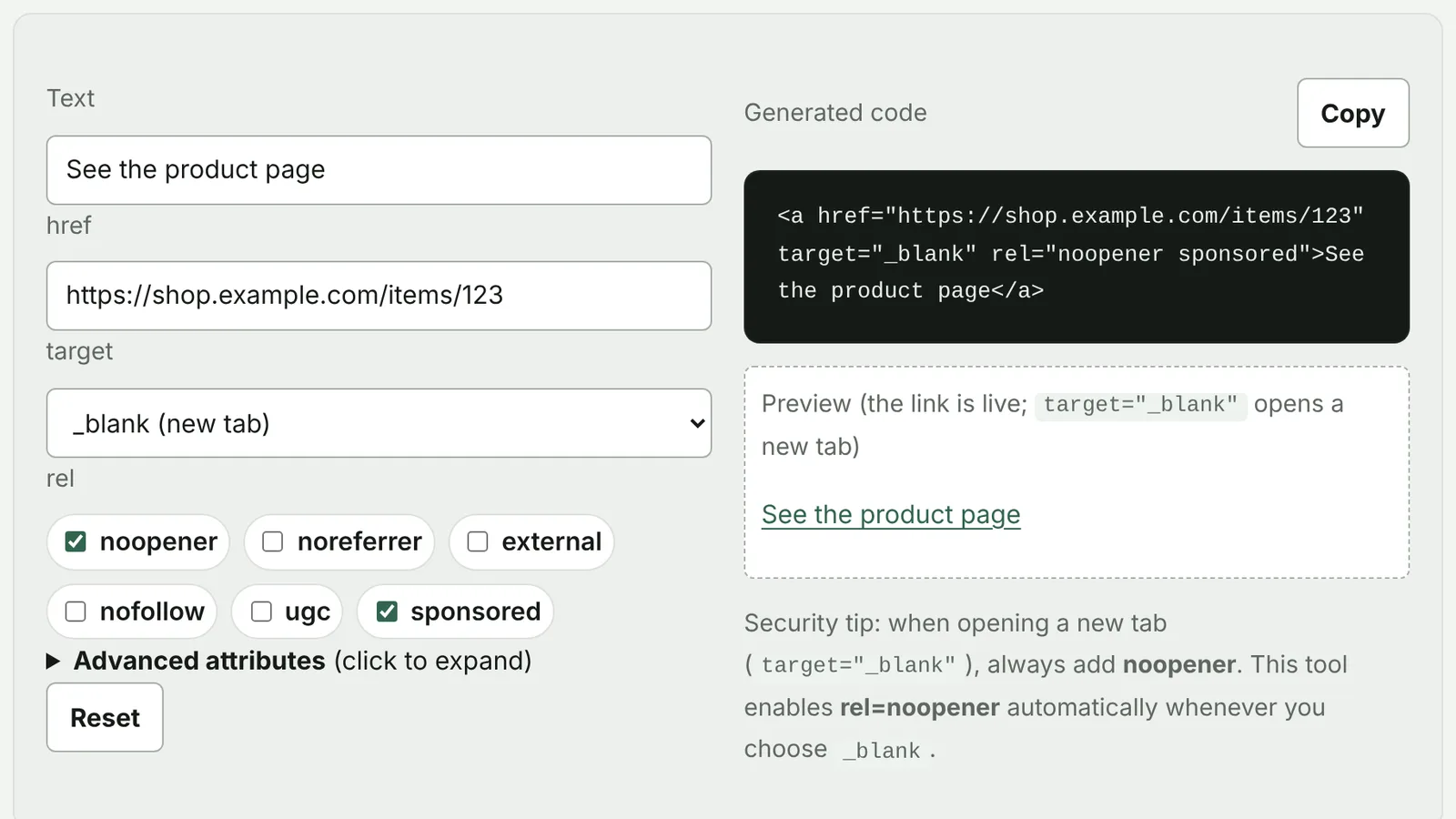
- In the link tag generator, enter the text to display as the link in “Text”. Here it is
See the product page. If you leave it empty, the href URL itself is displayed. - Enter the destination URL
https://shop.example.com/items/123in “href”. - Leave “target” at the default “_blank (new tab)”. “noopener” under “rel” is already ticked.
- Tick “sponsored” under “rel”.
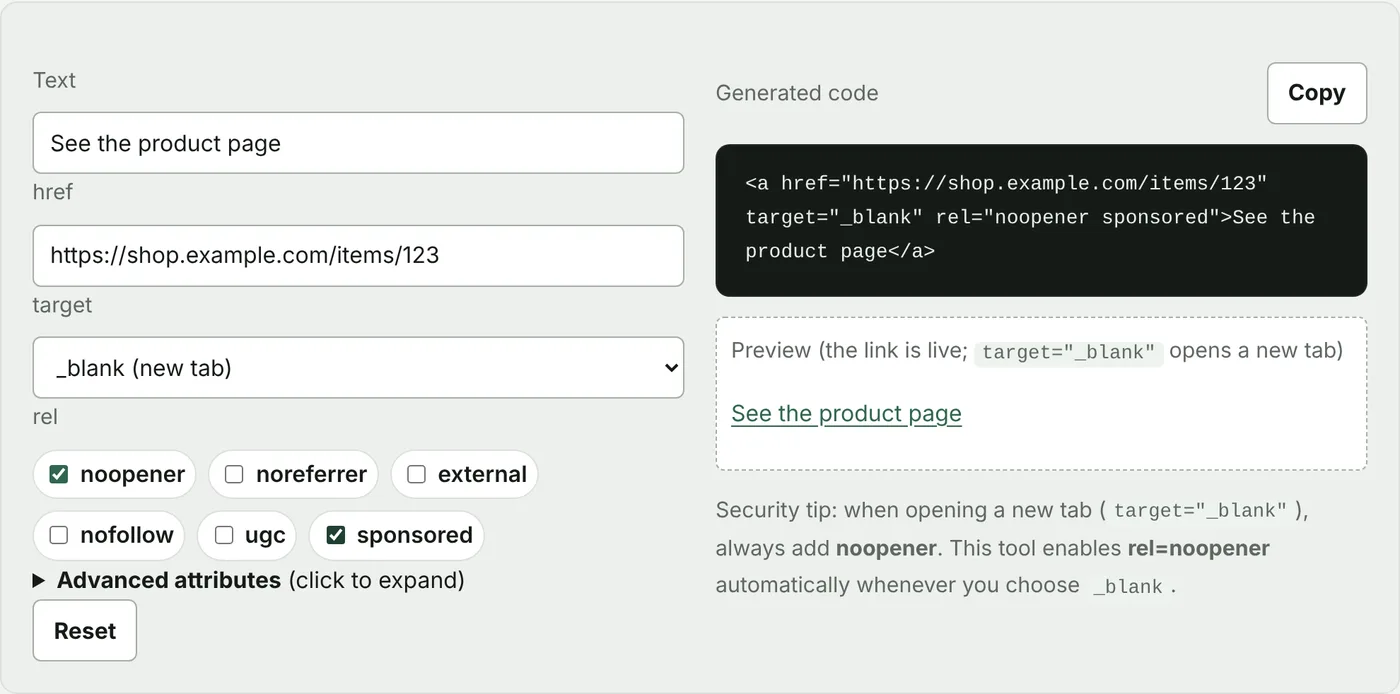
The “Generated code” panel on the right shows this tag.
<a href="https://shop.example.com/items/123" target="_blank" rel="noopener sponsored">See the product page</a>
rel accepts several values separated by spaces, and their order has no meaning. “Copy” puts the code on the clipboard. The preview below it is a working link, and clicking it opens the specified URL in a new tab, so you can check how it opens before pasting.
Links in comments get ugc and nofollow
If you are building your own blog comments or bulletin board and display URLs written by posters as links, add ugc. It tells search engines that the site owner has not vetted the link. In Google’s example it is combined with nofollow, as in rel="ugc nofollow".
To build a link in a comment that opens in the same tab:
- Enter the poster’s site name and URL in “Text” and “href”. Here they are
my-blog.example.netandhttps://my-blog.example.net/. - Set “target” to “(default: same tab)”.
- Untick “noopener” under “rel” and tick “nofollow” and “ugc”.
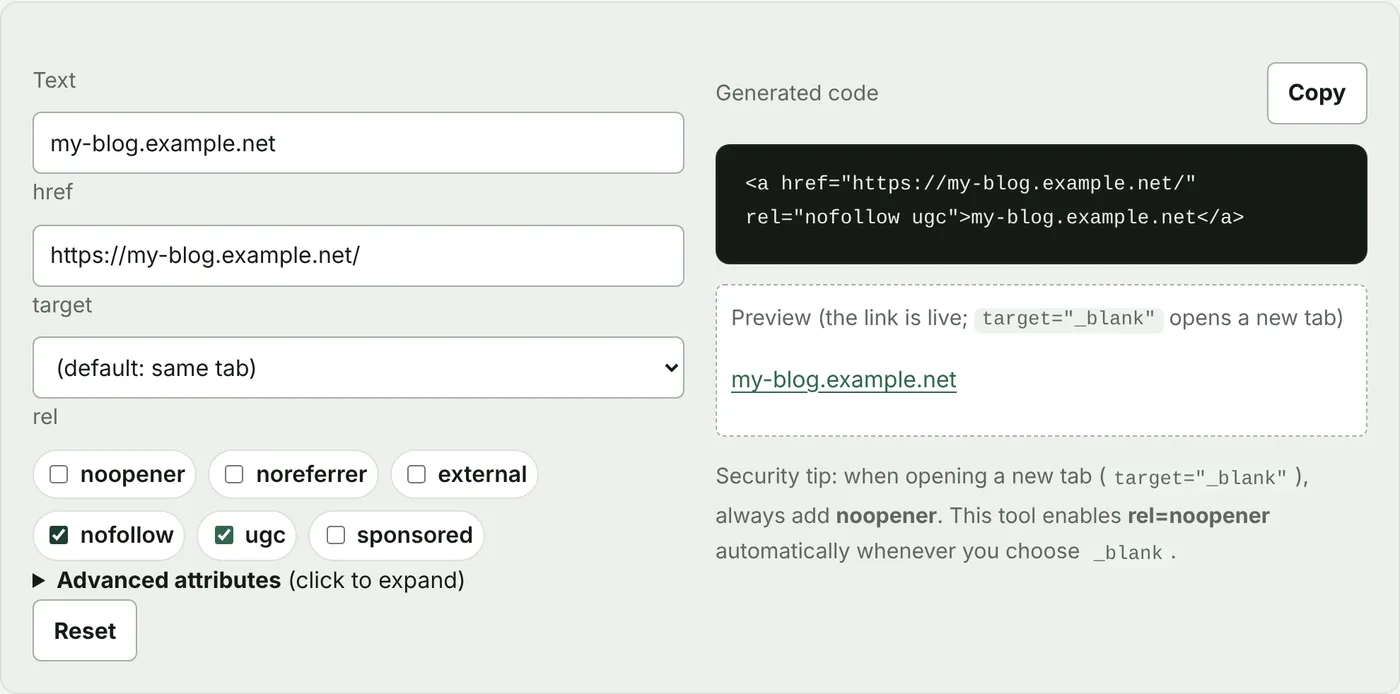
<a href="https://my-blog.example.net/" rel="nofollow ugc">my-blog.example.net</a>
When you choose the default for “target”, the target attribute is not output at all. Some CMSs, such as the standard WordPress comment form, add rel to commenters’ links automatically, so check the HTML currently being output before you rewrite a template.
nofollow and external do different jobs
nofollow is for links that fit neither of the other two, when you don’t want the destination to be counted in evaluation. One example is introducing a problematic site as a warning. When sponsored and ugc were added in 2019, Google announced that these values, nofollow included, would be treated as hints for ranking, and since March 2020 it also treats them as hints for crawling and indexing. Adding one does not mean the destination is always ignored.
The tool’s “rel” also has “external”. This is not a value for search engines. The HTML specification defines it as indicating that the destination is not part of the current site, and it does not appear in Google’s documentation. Use it as a marker inside your own site: add an icon only to external links with CSS a[rel~="external"], or process only external links in bulk with JavaScript. If you want to change how search treats an external link, use nofollow or sponsored, not external.
Add download to links that should save a PDF
From here we look at the attributes you can set by opening the tool’s “Advanced attributes”. A link to a PDF often opens inside the browser as is. If you want people to download the document, add the download attribute.
- Enter
Downloadin “Text” and/files/price-list-2026.pdfin “href”, set “target” to “(default: same tab)”, and untick every “rel” checkbox. - Open “Advanced attributes” and enter the filename you want it saved as,
price-list-2026.pdf, in “download (filename)”. A name takes priority over the “Attribute only (no value)” checkbox above it. If you don’t want to choose a name and only want thedownloadattribute, use the checkbox. - Enter
Download the 2026 price list (PDF)in “aria-label”. - Enter
application/pdfin “type”. You can also pick it from the suggestions in the input.
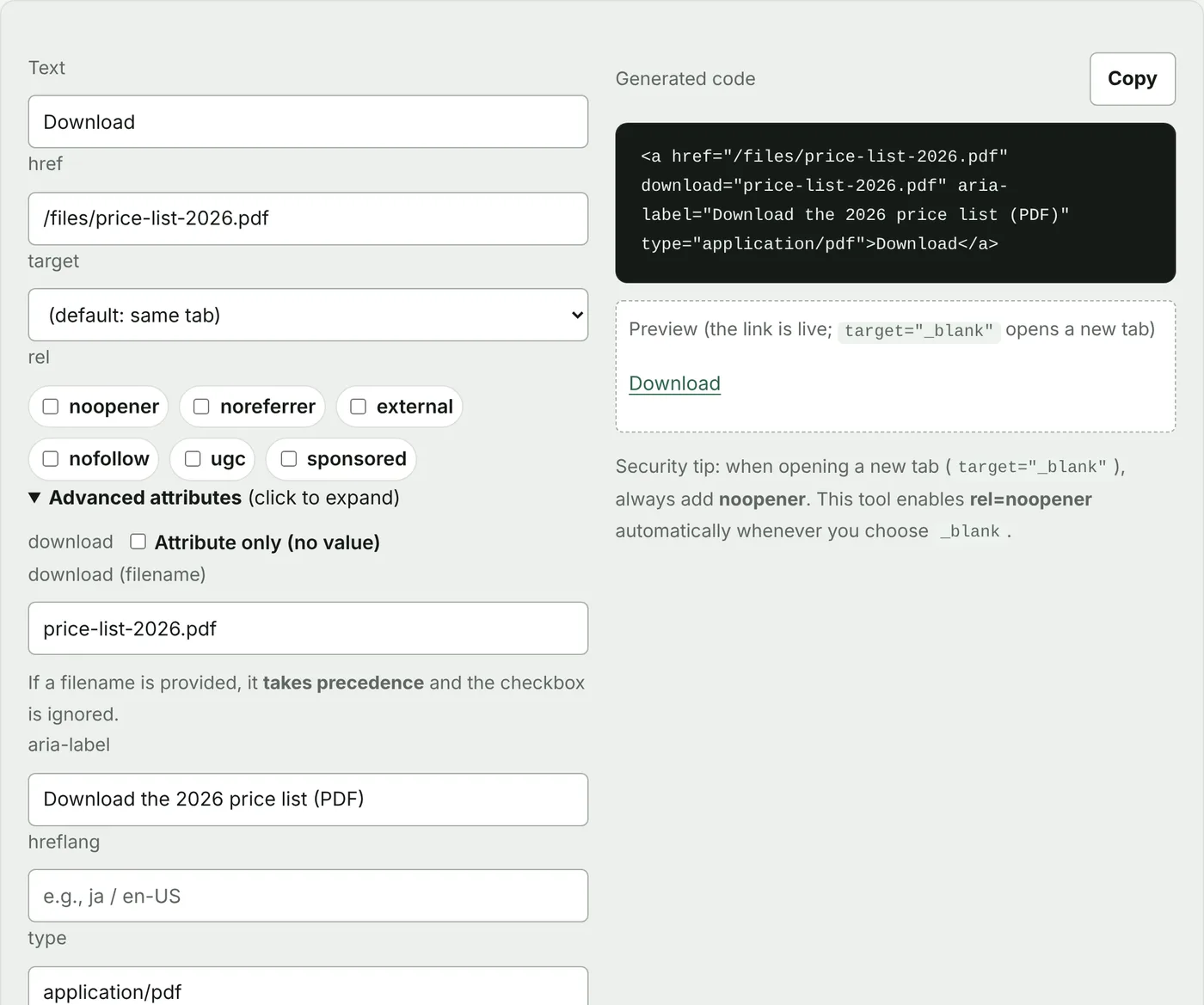
<a href="/files/price-list-2026.pdf" download="price-list-2026.pdf" aria-label="Download the 2026 price list (PDF)" type="application/pdf">Download</a>
aria-label becomes the name a screen reader reads out for the link. When the visible text is something like “here” or “Download”, which means nothing without context, it supplies what the link is about. Be aware, though, that the visible text then drops out of the spoken name. People who control links by voice select a link by saying the text they see, so, as in the example above, start the aria-label with the visible text (Download).
type is a hint about what kind of file the destination is, and the browser does not change how it handles the file because of it. The actual type is decided by the Content-Type the server returns.
When to use hreflang and referrerpolicy
“hreflang” says which language the destination page is written in. From a Japanese article linking to the official English documentation you can add hreflang="en", and use CSS a[hreflang="en"] to show an “English” marker. On a multilingual site, the hreflang that tells Google how each language version of a page corresponds goes in <link rel="alternate" hreflang="…"> in the <head>, in an HTTP header, or in the sitemap. Putting it on an <a> in the body is no substitute.
“referrerpolicy” is for changing how Referer is sent for just that link. With no-referrer, no Referer is sent, as with rel="noreferrer". Unlike noreferrer, though, it does not cut the window.opener reference, so how a link that opens in a new tab is handled is still decided by target and noopener. If you want to change the policy for the whole site, specify it with the Referrer-Policy header rather than writing it on each link.
“class” and “id” are names for CSS and JavaScript to refer to, and whatever you enter is output as is.
What to check before pasting
The generated code is already adjusted so that it can be pasted straight into HTML. If a URL contains & or ", they are output as & or ", and < and & in the text become < and &. If characters turn into garbage or an attribute gets cut off when you paste into a CMS text field, compare which characters were escaped. The idea behind HTML escaping is covered in the HTML entity conversion article, and URL encoding for Japanese characters and symbols in URLs in the URL encoding article.
If you leave “href” empty, the preview shows that no destination is specified, and the code has no href. An <a> without href does not work as a link, so click the link in the preview once before pasting to confirm that the page you intend opens in the way you intend. To start over, “Reset” returns everything to the defaults.