Fixing Japanese Mojibake Like “縺薙s縺ォ縺。縺ッ” and “ã“ã‚“ã«ã¡ã¯”: Reading the Cause From How It Looks, and What Can and Cannot Be Restored
Rows of “縺” and “繧”, rows of “ã” and “—, or “‚±‚ñ”: what garbled Japanese text looks like depends on which encoding the text was saved in and which one it was read with. I pasted real mojibake into the Mojibake Decoder and checked that UTF-8 read as Windows-1252 comes back perfectly, that guessed characters can be wrong when invisible characters were lost or in Excel's “縺” pattern, how double mojibake and =?ISO-2022-JP?B? email subjects are read, and why “�” and “锟斤拷” cannot be restored.
An email from a contact form arrives with the body full of “ãŠå•ã„åˆã‚ã›”. A CSV from a business partner opens in Excel as nothing but “縺” and “繧”. An old system’s logs or database hold columns of unreadable kanji. Mojibake (garbled text caused by reading characters with the wrong encoding) turns up in many places, and if you can reopen the original file, that is always the surest fix. The trouble starts when all you have left is the garbled string itself.
Most mojibake is not actually broken text. The bytes of characters saved as UTF-8 have simply been looked up in the table of a different encoding (such as Shift_JIS or Windows-1252), so different characters appear on screen. Turn the text back into bytes using the encoding it was misread with, read those bytes again with the correct encoding, and the original characters come back. If some bytes were thrown away along the way, though, that part cannot be recovered by calculation alone.
The Mojibake Decoder takes a garbled string, tries every combination of “encoding it was saved in” and “encoding it was displayed with”, and lists the restored candidates in order of readability. It runs inside the browser, and the text you paste is not sent anywhere. Here I created common kinds of mojibake myself, pasted them in, and checked how far they come back and where the tool starts guessing. Most examples are Japanese text, since that is where these patterns are most common. The screenshots were taken in the English version of the tool; the Japanese version has the same layout.
How the garbled text looks tells you the combination
For the same sentence, the combination of the encoding it was saved in and the encoding it was displayed with determines exactly how it turns into mojibake. Here is what happens to “こんにちは” (“hello”). Shift_JIS and EUC-JP are the traditional Japanese encodings that predate UTF-8; Shift_JIS (in its Windows form, CP932) is still the default in many Japanese Windows programs.
| Saved as → displayed as | Looks like | Telltale signs |
|---|---|---|
| UTF-8 → Shift_JIS | 縺薙s縺ォ縺。縺ッ | “縺”, “繧”, “繝” alternate with half-width katakana |
| UTF-8 → Windows-1252 | ã“ã‚“ã«ã¡ã¯ | Lots of “ã”, “—, “Ô |
| Shift_JIS → Windows-1252 | ‚±‚ñ‚É‚¿‚Í | Lots of “‚” (low quotation mark) and “ƒ” |
| EUC-JP → Shift_JIS | 、ウ、ヒ、チ、マ | Half-width “、” alternates with other characters |
| Shift_JIS → UTF-8 | �������� | A row of “�” |
In UTF-8, hiragana and kanji take 3 bytes each, and the first byte of almost every hiragana character is E3. Read through the Shift_JIS table, E3 81 becomes “縺” and E3 82 becomes “繧”. “縺” and “繧” keep repeating because the first and second bytes of each hiragana or katakana character are read as the same kanji every time. In Windows-1252, E3 is “ã”, so Japanese text turns into a sea of “ã”.
Excel on Japanese Windows reads a UTF-8 CSV without a BOM as Shift_JIS when you open it by double-clicking, so the contents of the sheet become rows of “縺” and “繧”. The “ã” pattern is typical when a database connection is still set to latin1 while storing and displaying UTF-8 text, or in email clients and CMSs (often non-Japanese ones) with the wrong encoding setting. The tool shows these typical situations for each combination in its candidates.
If you cannot tell which pattern your mojibake matches, enter some ordinary Japanese text under “Make mojibake samples” in the tool, and it shows how that text garbles in 12 combinations. Look for the row whose shape resembles yours.
Paste it and the candidates appear
All you do is copy the garbled part and paste it into the “Garbled text” box. Analysis starts as soon as you type; there is no convert button. It does not matter if normal Japanese text or ASCII letters and numbers are mixed in before or after it.
Imagining a contact-form email, I saved “お問い合わせありがとうございます。” (“Thank you for your inquiry.”) as UTF-8, displayed it as Windows-1252, and pasted the resulting mojibake.
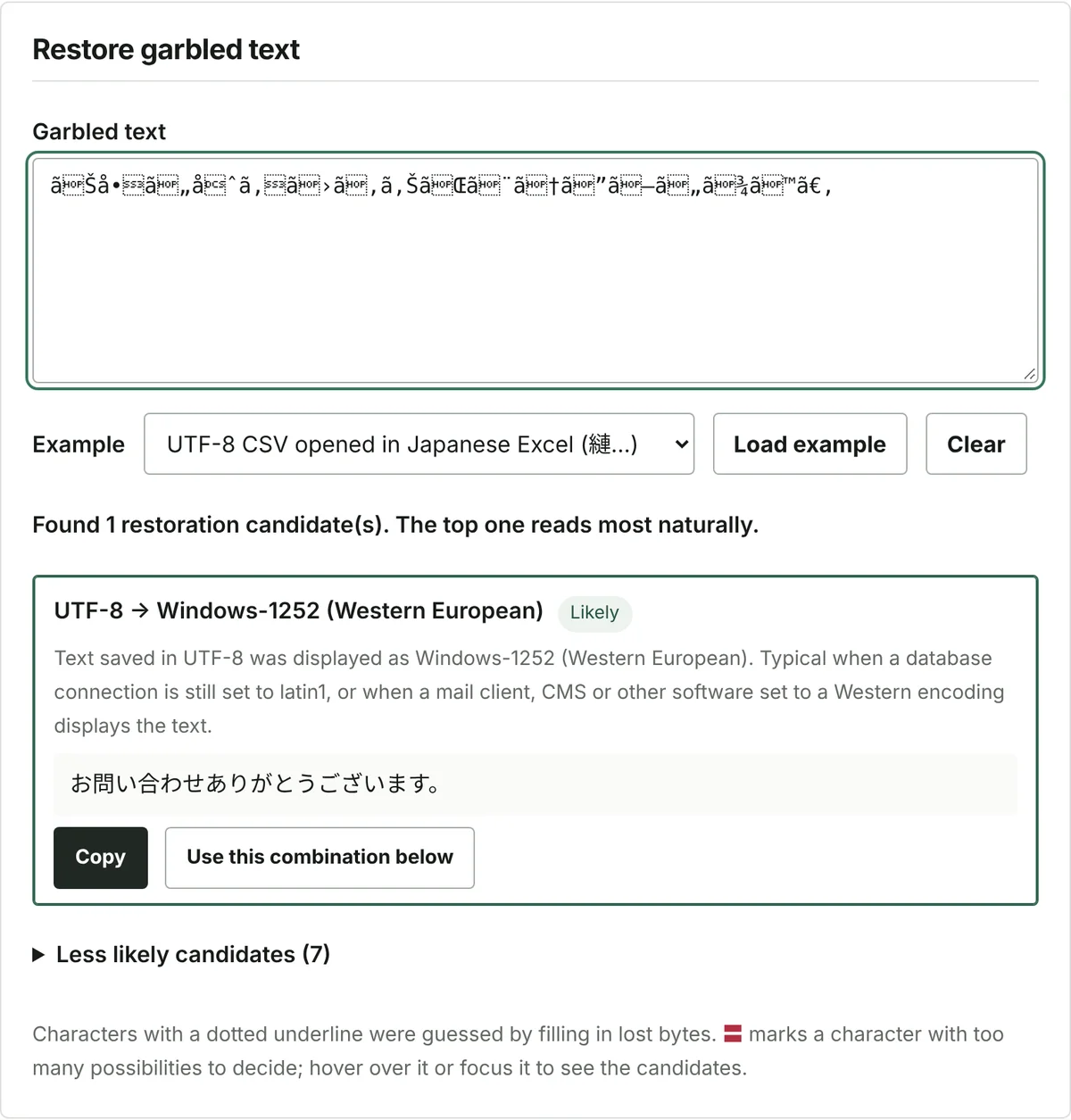
The top candidate shows the combination “UTF-8 → Windows-1252 (Western European)” with a “Likely” badge, and the restored text is “お問い合わせありがとうございます。”. Every character came back without guessing. Press “Copy” on the correctly restored candidate to put the restored string on the clipboard.
The “‚±‚ñ‚É‚¿‚Í” type, which you get when a Shift_JIS email is opened in English-language software, also comes back just by pasting it. “見積書を送付いたします。” (“I am sending you the quotation.”) garbled through Shift_JIS → Windows-1252 into “Œ©Ï‘‚ð‘—•t‚¢‚½‚µ‚Ü‚·B”, and the “Likely” candidate restored the original sentence.
Sometimes several candidates are listed. The top one is the most readable; the others are combinations that merely produce valid characters. Candidates that clearly make no sense are collapsed under “Less likely candidates”.
When invisible characters are lost, the tool fills them in by guessing
In Windows-1252, the five bytes 81, 8D, 8F, 90 and 9D have no visible character assigned. Browsers treat them as control characters, so they can disappear while you copy and paste the garbled string. Some of the symbols in the input box in the screenshot above are exactly these.
When I pasted “ãŠå•ã„åˆã‚ã›ã‚ã‚ŠãŒã¨ã†ã”ã–ã„ã¾ã™ã€‚” with the control characters removed, this is what I got.
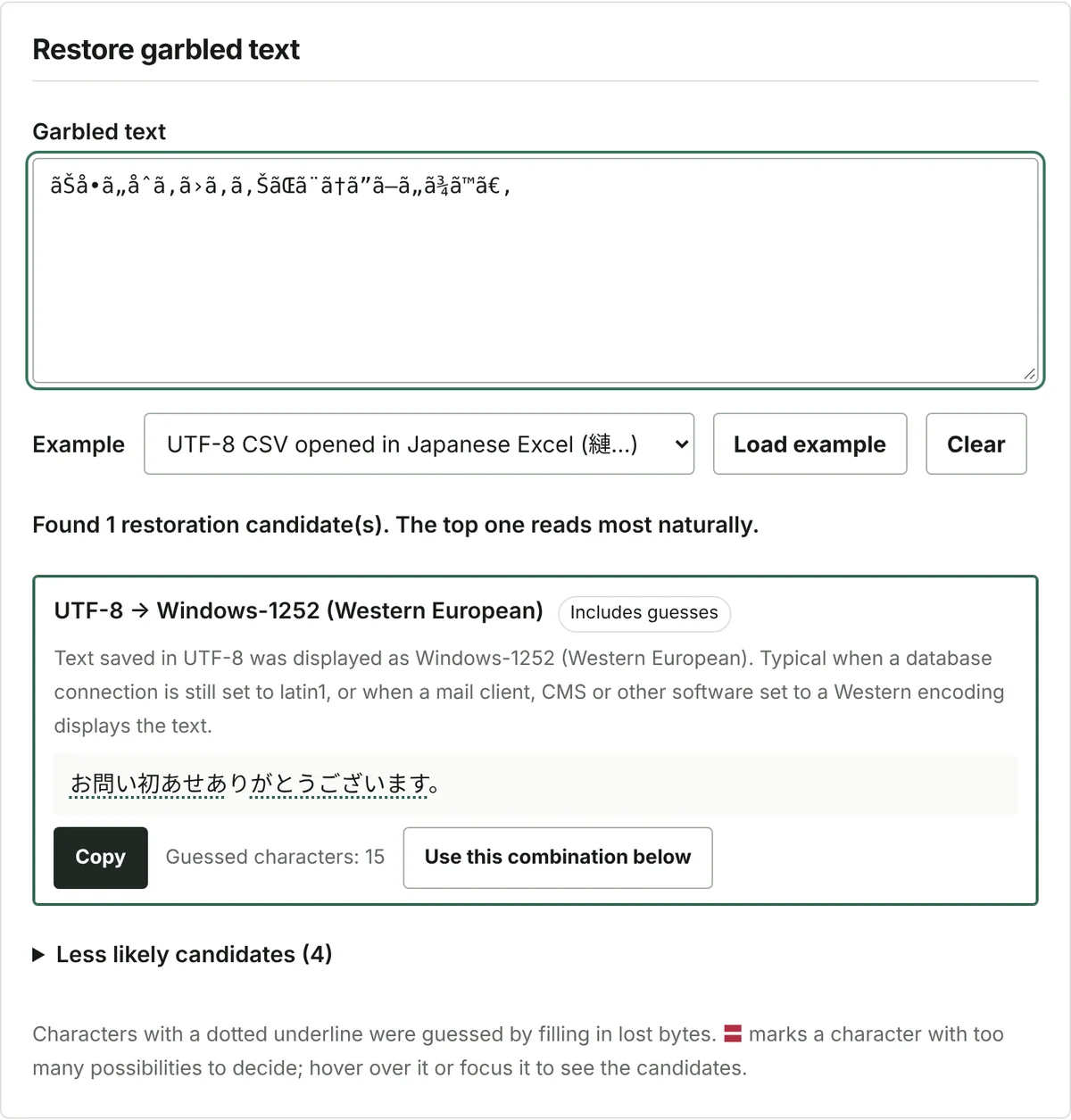
The combination was again identified as “UTF-8 → Windows-1252”, but the badge changed to “Includes guesses” and 15 characters got dotted underlines. A dotted underline means the character was filled in by trying values the lost byte could have had. The result was “お問い初あせありがとうございます。”: “合わ” was guessed as “初あ”. The string itself does not reveal where the missing bytes were, so the tool may pick a different combination that also forms valid characters.
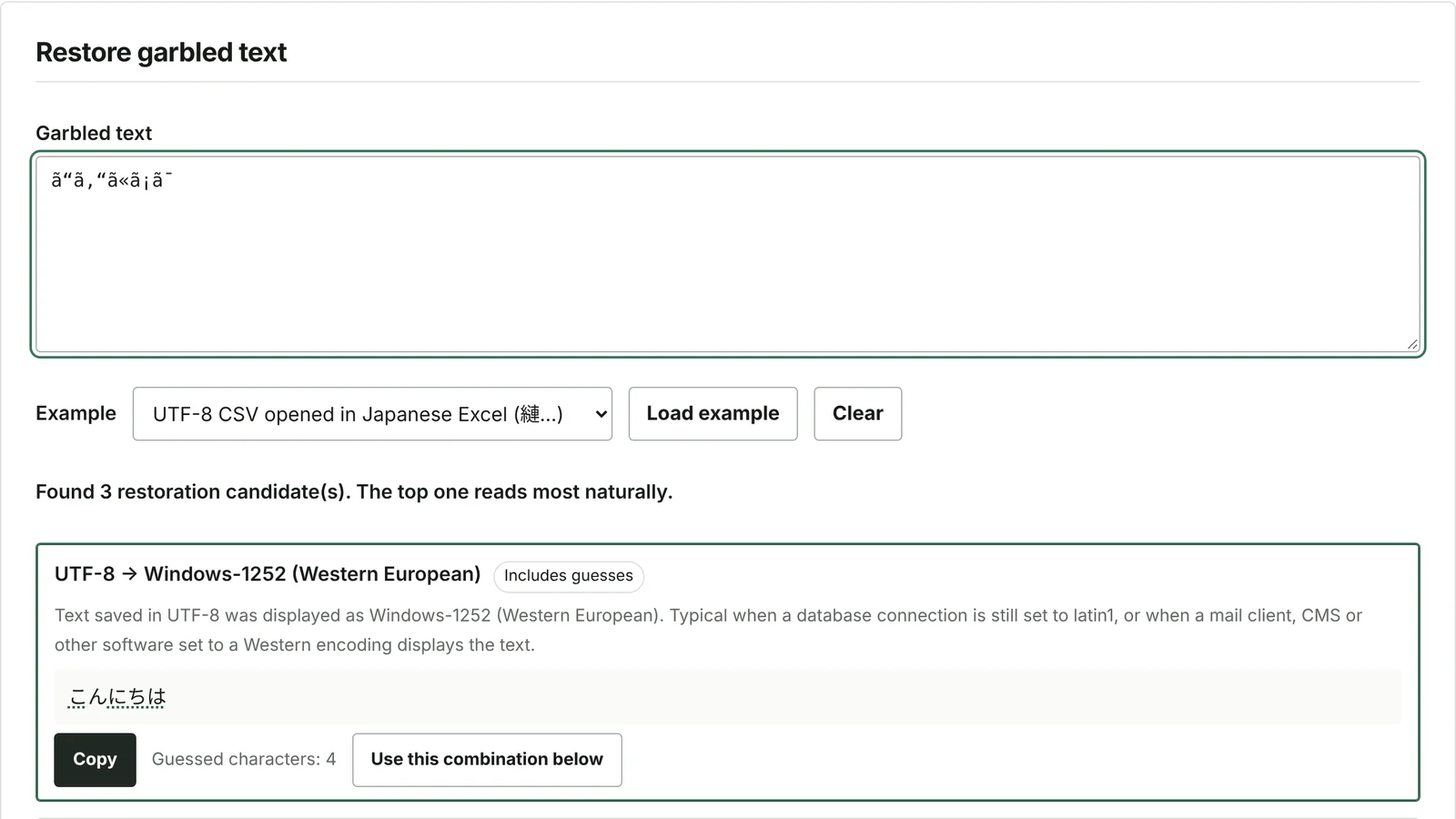
The “ã“ã‚“ã«ã¡ã¯” in the screenshot at the top of this article was also restored to “こんにちは” after losing four control characters. For a short greeting the guess is often right, but characters with dotted underlines need to be checked against the context. If you can still open the original email or page, copying again from the email source or a saved file, rather than from the displayed text, may keep the control characters so no guessing is needed.
Excel’s “縺” tends to leave missing characters
UTF-8 → Shift_JIS is the most familiar kind of mojibake by its look, but also the hardest to restore. When the 3-byte UTF-8 sequences are read in Shift_JIS’s 2-byte units, the reader runs into byte sequences that do not exist in Shift_JIS and replaces them with “�”. One or two bytes are thrown away at that point.
I garbled “明日の打ち合わせは午後二時からに変更になりました。会議室は三階の第二会議室です。資料は前日までに共有フォルダに置いておきます。” (“Tomorrow’s meeting has been moved to 2 p.m. The meeting room is Meeting Room 2 on the third floor. I will put the materials in the shared folder by the day before.”) through UTF-8 → Shift_JIS. The result starts with “譏取律縺ョ謇薙■蜷医o縺帙�蜊亥セ御コ梧凾…” and contains seven “�”. Here is what happened when I pasted it.
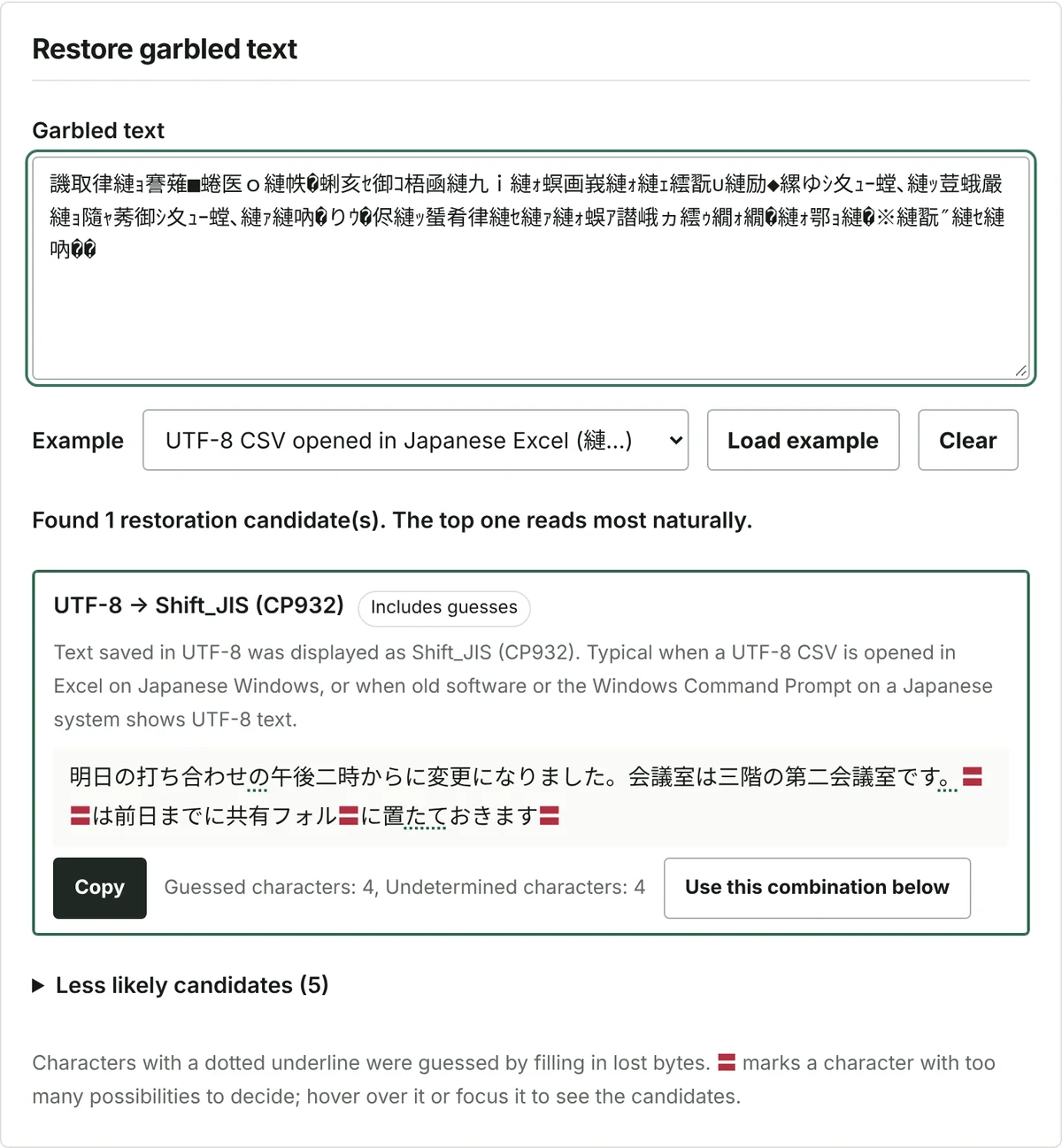
The combination was correctly identified as “UTF-8 → Shift_JIS (CP932)”, and most of the sentence came back. The restored text, however, was “明日の打ち合わせの午後二時から…会議室です。〓〓は前日までに共有フォル〓に置たておきます〓”. Four characters were guessed and four could not be determined.
A red 〓 is a character for which too many candidates fit the missing bytes, so the tool did not pick one. Hover over it or focus it to see the candidates. For the two characters of “資料” (“materials”), the candidates were “賀賂賃賄資賊賎賑賓賛賜賞賠” for the first and “料薙” for the second. The 〓 in “フォル〓” has candidates that include the katakana “ダ”. At this level, a person reading it can tell it is “資料” and “フォルダ” (“folder”).
Guessed characters can be wrong even with their dotted underline. In this example, the “は” in “打ち合わせは” became “の”, and the “い” in “置いて” became “た”. In both cases, among the candidates that form valid characters after filling in the missing bytes, the tool chose a frequently used hiragana. Where the sentence reads unnaturally, suspect the dotted characters and read them differently.
With very short input of about two characters, there is no context, so guesses miss more often: “はい” (“yes”) garbled and restored came back as “はた”.
If you have the original CSV, reopen the file
All this guessing is for when nothing but the garbled string is left. If you still have the original CSV file, reading the file again with the correct encoding is far more reliable than pasting what you see into this tool. To change a file’s encoding, you can use the Character Encoding Converter. It detects the encoding of the input file automatically and can output UTF-8 with a BOM or Shift_JIS. If Python or pandas throws an error when reading a CSV, I explained how to identify the encoding from the first bytes in “Reading a CSV in Python fails with UnicodeDecodeError: ‘utf-8’ codec can’t decode” (in Japanese).
Double mojibake comes back in one step too
If garbled text is saved as UTF-8 as it is and then misread the same way again, you get double mojibake. You see it in data that has gone through repeated CMS migrations or database re-imports, and it looks like “会è°…”, with “Ô and “” alternating.
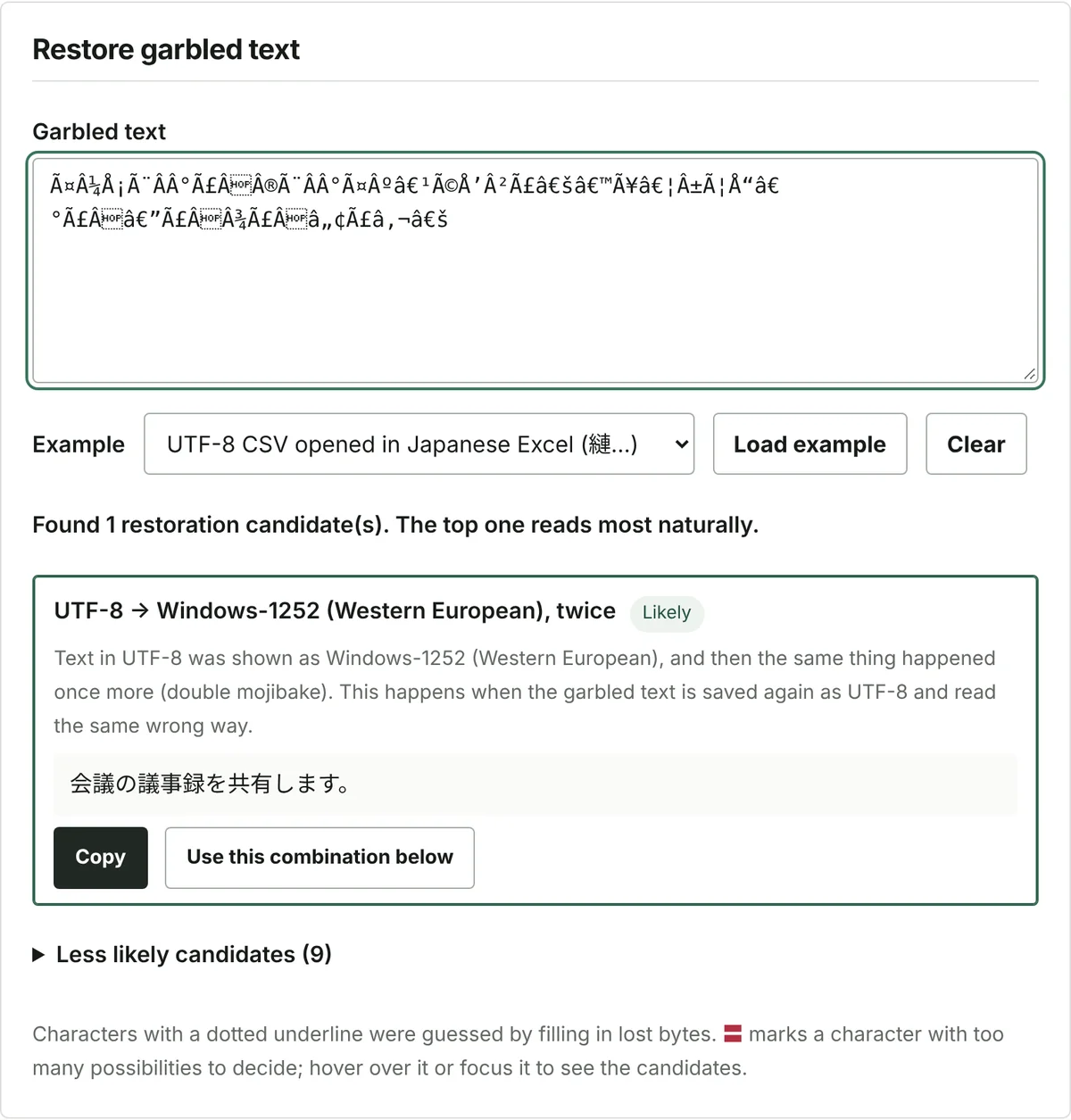
I garbled “会議の議事録を共有します。” (“I am sharing the meeting minutes.”) through UTF-8 → Windows-1252 twice in a row. The tool identified it as “UTF-8 → Windows-1252 (Western European), twice” and restored the original sentence. After undoing only one step, it still looks garbled, like “会è°ã®è°äº‹…”, so if you undo it by hand one step at a time, it is easy to lose track of how far you need to go. For common combinations, the tool tries a second step even when the first step does not make the text readable.
Email subjects and URL “%E3%81” work in the same box
Some things that people call mojibake are really just encoded notation. Paste them into the same box and the tool reads the notation and turns it back into characters.
| What I pasted | What the tool read |
|---|---|
Subject: =?ISO-2022-JP?B?GyRCJDMkcyRLJEEkTxsoQg==?= |
Subject: こんにちは (MIME-encoded email subject) |
%E6%96%87%E5%AD%97 |
文字 (URL encoding) |
b'\xe6\x96\x87\xe5\xad\x97' |
文字 (Python bytes notation) |
\u6587\u5B57 |
文字 (Unicode escapes in JSON or JavaScript) |
$B$3$s$K$A$O(B |
こんにちは (ISO-2022-JP with ESC stripped) |
The last one, $B…(B, is JIS code (ISO-2022-JP), the encoding traditionally used for Japanese email, with the escape characters (ESC) that switch between character sets removed. It can remain in text that has passed through old email clients or systems that delete control characters. The tool adds the ESC back and reads it. It also handles Quoted-Printable in email bodies such as =E3=81=93, and HTML references such as こ.
If your task is building URL query strings, the URL Encoder / Decoder makes it easier to compare input and output.
“�”, “锟斤拷” and “鐃緒申” cannot be restored
Some mojibake cannot be undone. “�” (U+FFFD, the replacement character) marks bytes that the reading software could not interpret, and the original bytes were discarded when they were replaced. Opening a Shift_JIS file as UTF-8 puts most hiragana and kanji into this state.
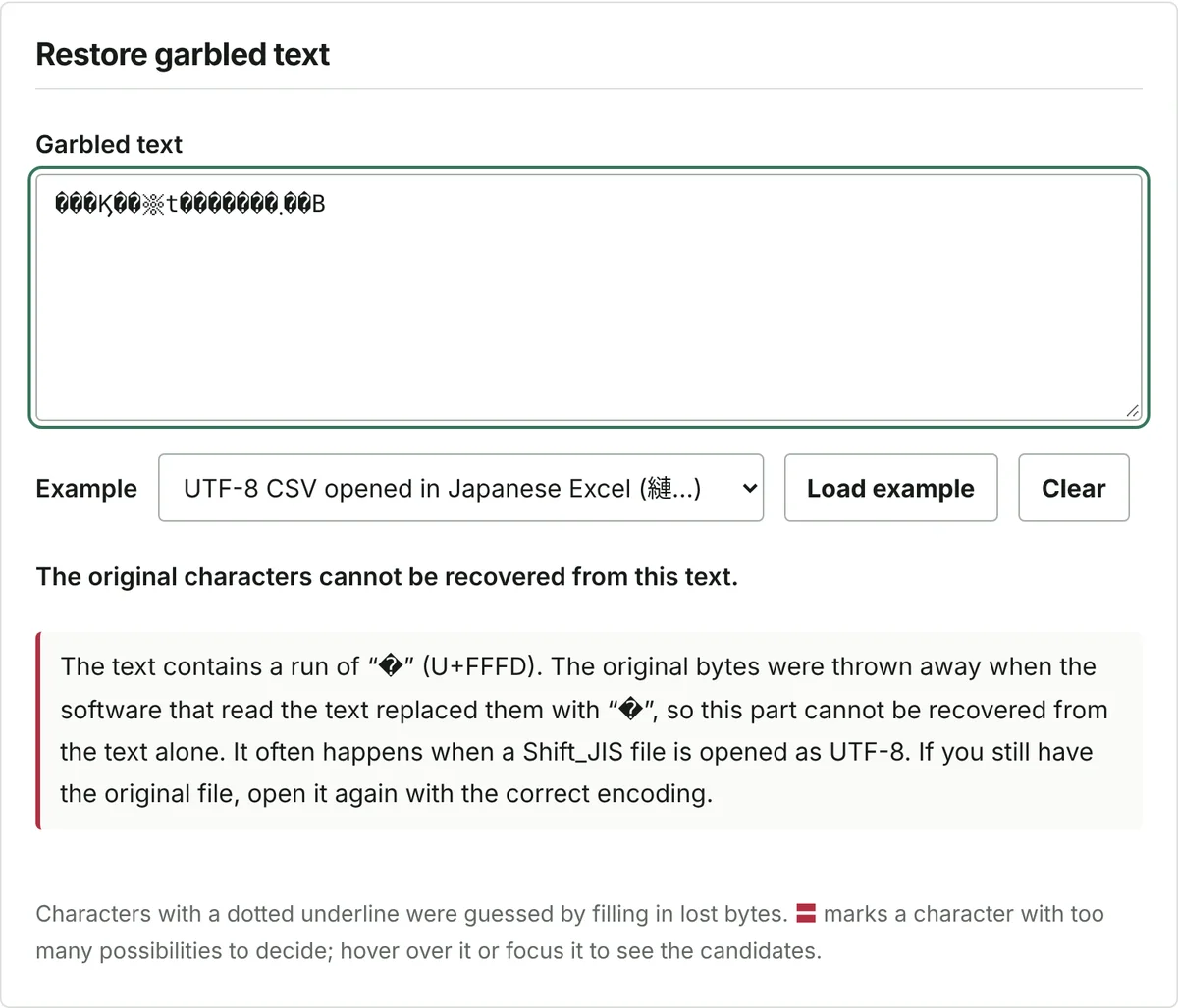
When I pasted “見積書を送付いたします。” garbled through Shift_JIS → UTF-8, no candidates appeared, and the tool said “The original characters cannot be recovered from this text.” Rather than inventing a plausible-looking candidate, it explains why recovery is impossible and suggests reopening the original file with the correct encoding.
“锟斤拷”, seen on Chinese systems, and “鐃緒申”, seen on Japanese systems, belong to the same family. They appear when characters that have already become “�” are saved as UTF-8 and then displayed as GBK or EUC-JP, and the original characters are lost here too. Again, the only option is to find the original data.
When the automatic detection misses, choose the combination yourself
If none of the candidates is right, or you already know the combination, use “Decode with chosen encodings”. Select the “Original encoding (when saved)” and the “Display encoding (when garbled)”, and for double mojibake set “Times” to 2. The result is built from the string in the input box above.
Pressing “Use this combination below” on one of the automatic candidates puts that candidate’s combination here. When you have many garbled strings from the same system to restore, confirm the combination with the first one, and after that you only need to paste each new string.
Problems that are not mojibake at all, such as invisible characters like zero-width spaces or a BOM breaking searches and comparisons, can look similar. In that case, the Invisible Character Checker shows what the characters actually are. For situations where files in different encodings arrive in bulk from different departments and systems, see “How to Safely Rescue Mixed-Charset Files in Bulk”.