Does .gitignore seem to have no effect? Stop tracking a log and keep your local copy
Use a log that still shows up after you add it to .gitignore to check Git’s ignore rules and tracking state. Try git rm --cached in three working copies to see what remains on your machine and what happens when coworkers pull the same commit.
You added /app.log to .gitignore. Yet every time you run the app, git status shows modified: app.log again. The clue is modified. Git already knows the previous contents of this file and is comparing them with what it sees now.
.gitignore comes into play when Git finds a file it has yet to track. If you add an ignore rule after committing the log, Git keeps tracking it. How do you stop sharing the log and still keep your local copy? If you test only in your own copy, it’s easy to overlook what happens when a coworker receives the change. Git ignore rules reference
1. Check whether Git is tracking the log
This example uses app.log at the root of the repository. If you are already running into this issue, start by running the following command from your repository root. It checks the tracking state and leaves file contents alone.
git ls-files -- app.log
If the output is app.log, that path is in the index. The index is where Git records the files and contents for the next commit. The next command tells you which ignore rule matches the log regardless of whether Git tracks it.
git check-ignore -v --no-index -- app.log
For example, .gitignore:1:/app.log app.log shows that /app.log on the first line of the root .gitignore matches. The rule already applies, so adding * before the file name won’t help. A regular git check-ignore -v omits tracked files by design. Here --no-index lets you check the rule without consulting the index. git check-ignore reference
If the first git ls-files command prints nothing, the path is already untracked. If the file is actually at logs/app.log, for example, /app.log in the root .gitignore won’t reach it. Pass the actual path, as in git check-ignore -v -- logs/app.log, and check where the rule is defined and how it’s spelled. If the reported pattern begins with !, it cancels the ignore rule for that path.
2. Keep the log on disk and leave it out of the next commit
Use these steps when Git tracks app.log and the team has decided to stop sharing it. If other people use their local logs, ask them to save any copies they need outside the repository before you share the commit. The next section shows why.
-
Add
/app.logon its own line in the root.gitignoreand save the file. If it already contains rules, append the new one. -
Run the following two lines in order. The first stages the ignore rule and the second stages removal of the log from tracking. Both changes will go into the same commit. With
--cached, the log stays on your disk. git rm referencegit add -- .gitignore git rm --cached -- app.log -
Run
git diff --cached --name-statusto review the changes that will go into the commit. If you just created.gitignore, you’ll see these two lines. If you added the rule to an existing file, expectMin place ofAin the first line.A .gitignore D app.logThe
Dcan be surprising. It means the log will be absent from the next commit. Open your localapp.logat this point and you can still read its contents. Make sure you haven’t staged unrelated changes before you commit.git commit -m "Stop tracking app.log" git status --ignored --short -- app.logIf the last command prints
!! app.log, Git is now ignoring the local log. Future additions to the file will stay out of the regular change listing. Logs saved in earlier commits remain in the history at those revisions.
3. See what happens when coworkers pull the same change
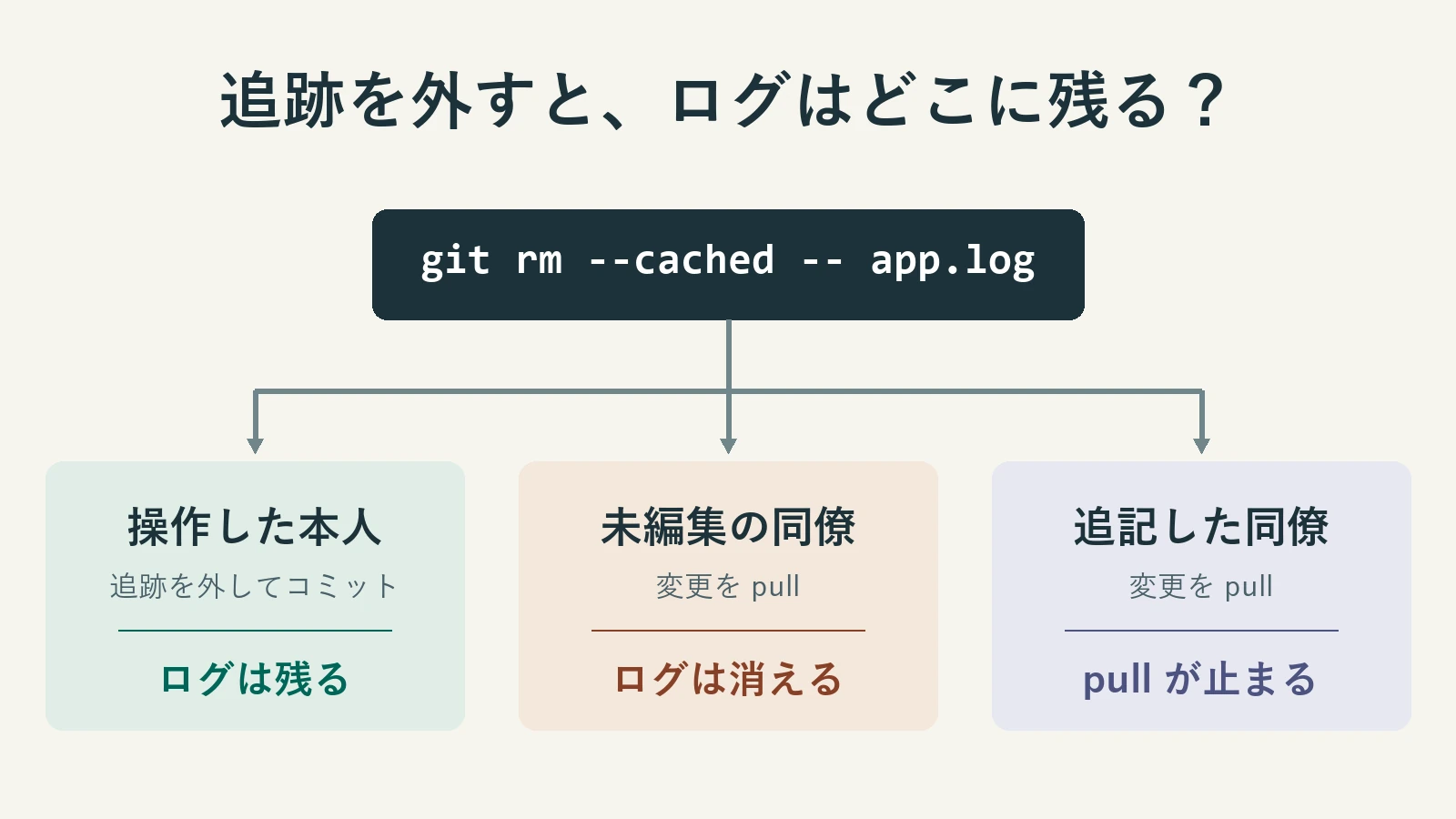
--cached preserves the working file for the person who runs the command. Anyone who receives the commit gets a new revision that leaves out app.log. This is where the results diverge.
Using Git for Windows 2.50.1, I committed a log with a single line, first, and made two clones at that revision. I left the log untouched in one clone and added personal in the other. In the original repository, I appended second and used the previous steps to stop tracking the log. Then I ran git pull --ff-only in each clone. Here is what happened.
| Working copy | app.log after the operation |
|---|---|
| Person who stopped tracking the log | Both lines, first and second, remain. |
| Coworker with an unedited log | The pull succeeds and removes the file. |
Coworker who added personal |
The pull stops with a message that local changes would be overwritten. Both lines remain. |
When you stop sharing a file, it’s easy to overlook the coworker who hasn’t edited their log. Since Git sees the same contents as in the previous commit, it can apply the deletion directly. If you tell people their logs are safe because yours stayed on disk, they can lose theirs when they receive the commit.
Try it in three working copies (PowerShell)
-
Create a new empty folder outside any other repository and open PowerShell there. Run the following commands to make the first commit with just the log. The example uses
git add -fonly on the practice log to reproduce a tracked file even if your personal ignore settings would otherwise exclude it. The name and email settings apply to this repository only.git init -b main author Set-Location author git config user.name "Example" git config user.email "example@example.org" Set-Content -Encoding ascii app.log first git add -f -- app.log git commit -m "Track the first log" Set-Location .. -
Use the following commands to make two copies from the same commit and append a line in only one of them. The last two lines return to the original repository and append a different line there.
git clone author coworker git clone author modified Add-Content -Encoding ascii modified/app.log personal Set-Location author Add-Content -Encoding ascii app.log second -
In
author, create.gitignore, stop tracking the log and commit as described in the previous section. Then runSet-Location ../coworkerto enter the untouched copy, rungit pull --ff-onlyand check thatTest-Path app.logreturnsFalse. -
Use
Set-Location ../modifiedto enter the copy with an added line and run the same pull. The update stops here. IfGet-Content app.logstill showsfirstandpersonal, you’ve reproduced the third row of the table. Both copies pull from the localauthorrepository, so there is no need to push to a server.
If the pull stops in the edited copy
In this example, the third person wanted to keep the uncommitted line. They copied app.log outside the repository under a different name, opened the copy and verified that personal was at the end. After checking the backup, they ran git restore -- app.log to restore only the working copy of the log. The next git pull --ff-only succeeded. Finally, they copied the backup back to the original location as app.log. The added line survived and Git reported !! app.log.
In this test, the coworkers’ branches had no commits of their own and the new line in the log was unstaged. In other situations, bringing in the change may require resolving conflicts. When announcing that the team has stopped tracking the log, add one request. Copy any logs you need before pulling. Git won’t ask for confirmation before removing an unedited log.