Japan–US time difference: how to pick meeting times across time zones, and why they shift in March and November
10:00 on Friday in Japan is 17:00 on Thursday in Los Angeles and 20:00 on Thursday in New York, and a meeting sent as "10:00 EST" starts at midnight in Japan. Using real dates in a time zone converter, this walkthrough checks whether Tokyo, Los Angeles and New York share any working hours, and which meetings move by an hour when daylight saving time starts or ends.
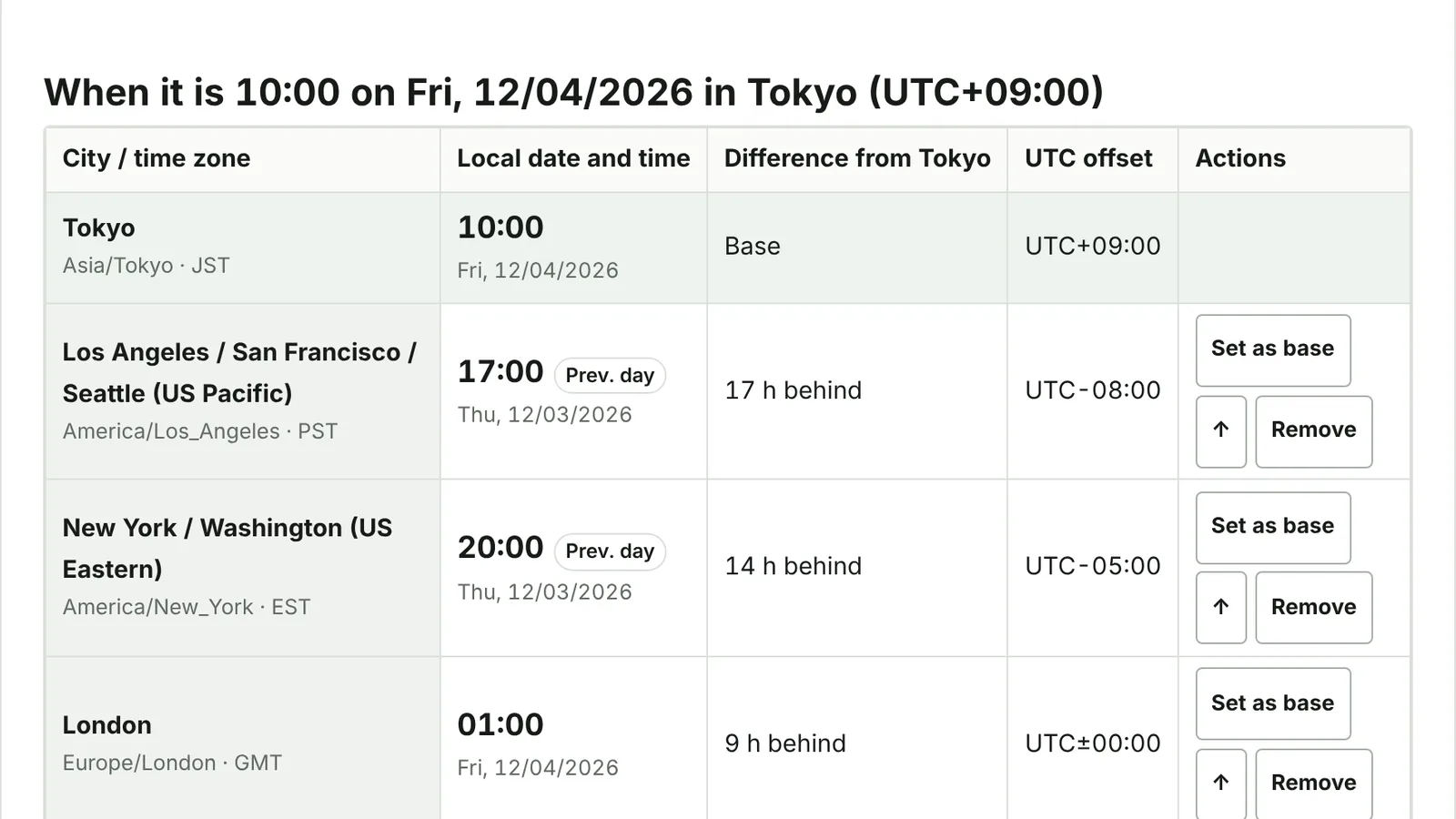
When you arrange a call with clients or colleagues on the other side of the world, the hard part is usually not the number of hours between you but the date and the season. Friday morning in Japan is still Thursday in the US. A meeting that arrives from the US as “Tuesday 10:00 EST” falls at midnight on Wednesday in Japan. And twice a year, in March and November, a time difference that was correct yesterday changes by an hour.
For context: Japan uses Japan Standard Time (JST, UTC+9) all year round and has no daylight saving time. Any seasonal change in the time difference between Japan and another country therefore comes entirely from the other side switching its clocks.
The Time Zone Converter takes a date and time in one city and shows, all at once, the local time in every city in its list, the difference from the base city, the UTC offset, whether the date there is the previous or next day, and whether daylight saving time is in effect. This article follows someone in Japan scheduling with people in the US and the UK, using real dates. The screenshots are from the English page of the tool. If you are based somewhere else, the same steps work with your own city as the base.
Convert a time in Japan to local times abroad
When you open the English page, the base city is your browser’s time zone, and the date and time are set to the current time there. The list starts with four cities: your time zone, New York, London and Tokyo. As soon as you change the date or time, the list updates without pressing any button.
To reproduce the example below, open this link. It sets Tokyo as the base city, enters 10:00 on Friday, December 4, 2026, and shows Tokyo, Los Angeles, New York and London, as in the screenshot.
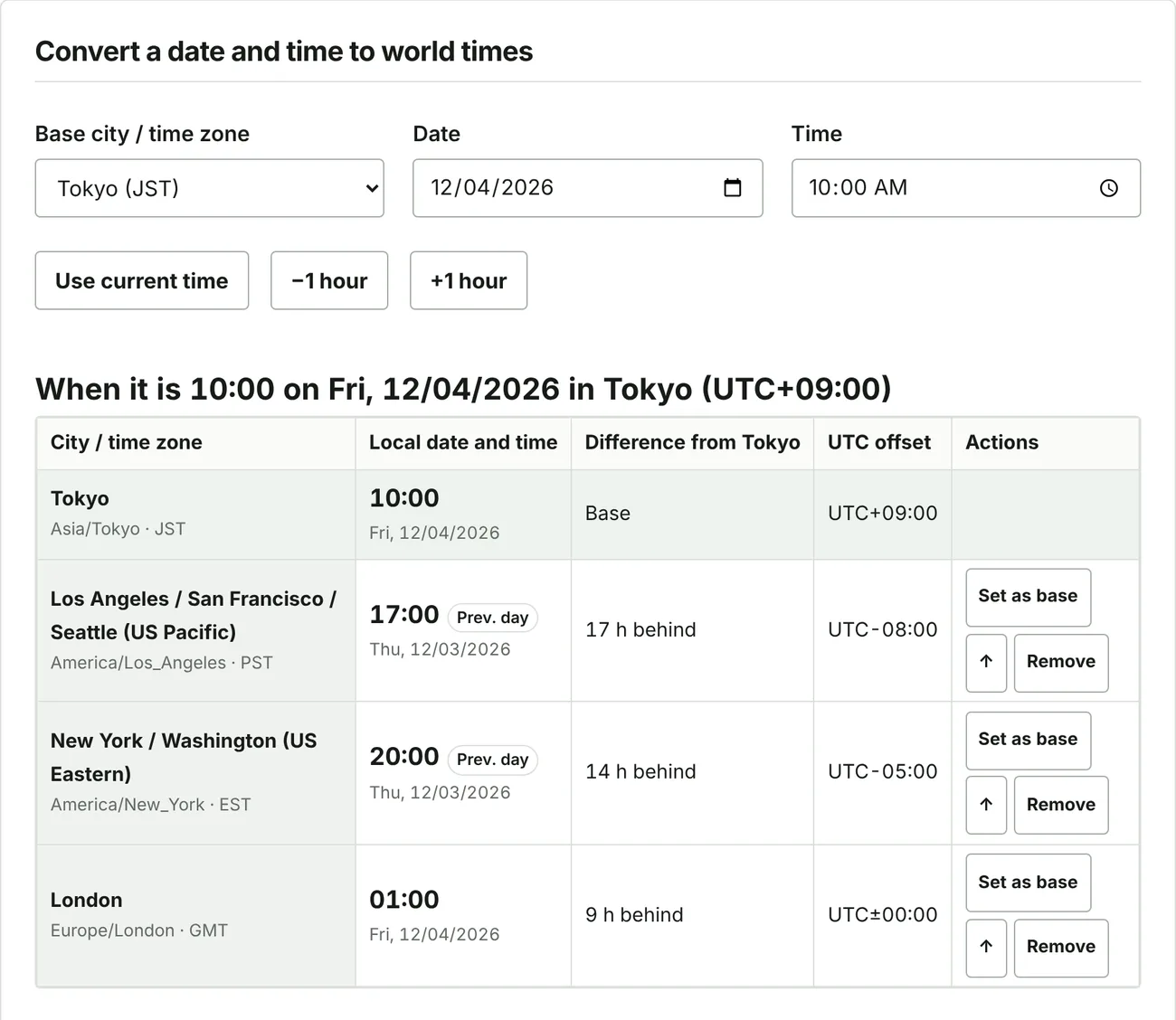
| City | Local date and time | Difference from Tokyo | UTC offset |
|---|---|---|---|
| Tokyo | Fri, Dec 4, 10:00 JST | Base | UTC+09:00 |
| Los Angeles | Thu, Dec 3, 17:00 PST | 17 h behind | UTC-08:00 |
| New York | Thu, Dec 3, 20:00 EST | 14 h behind | UTC-05:00 |
| London | Fri, Dec 4, 01:00 GMT | 9 h behind | UTC±00:00 |
A message sent on Friday morning in Japan reaches Los Angeles near the end of the working day on Thursday, and New York on Thursday evening. If the recipient reads it the next morning, 9:00 on Friday in Los Angeles is 2:00 on Saturday in Japan. The reply lands during the Japanese weekend, and you read it on Monday. If you need someone in the US to act on something during their Friday, it is better to send it while it is still Thursday in Japan.
To add more cities, choose one under “Add a city” below the table and press “Add”. The options cover major cities in Asia, Europe and Africa, North America, South America and Oceania, plus UTC, and up to 12 cities can be listed at once. For a place not in the list, choose “Other (enter an IANA name)” and type a Region/City name such as Europe/Dublin.
“Copy times as text” copies all the lines shown below the table, such as “Tokyo: Fri, 12/04/2026 10:00 JST (UTC+09:00)”. When you propose a time by email or chat, you can include each recipient’s local time, which makes it harder for them to convert it wrongly.
Convert a meeting sent as “10:00 EST” to Japan time
The opposite case is just as common: someone abroad sends you a time in their own zone. Suppose a contact in New York invites you to a call at “10:00 EST on Tuesday, December 8”. Switch the base city to New York and enter the date and time exactly as you received them. You can also press “Set as base” on the New York row in the list.
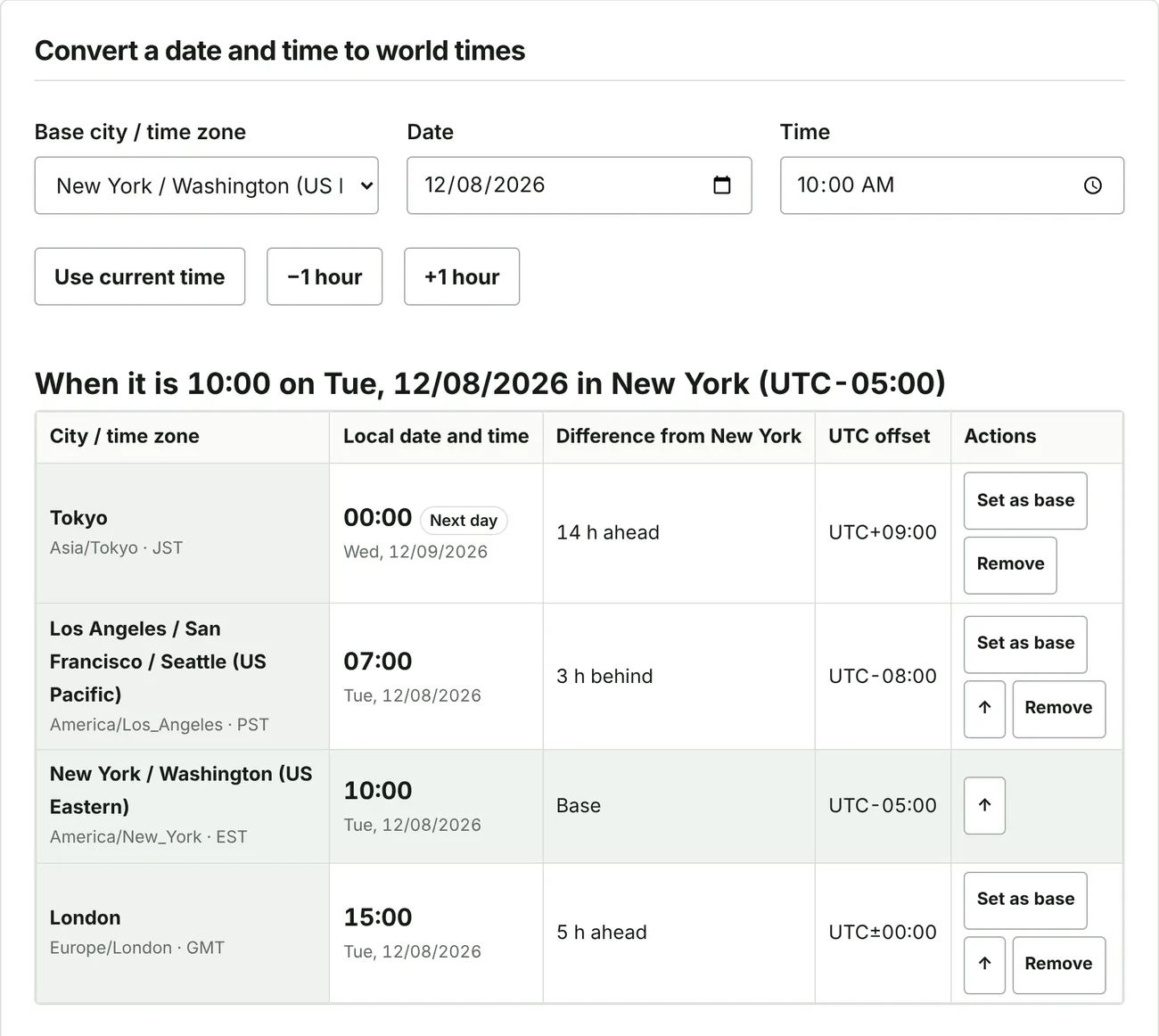
The Tokyo row shows 00:00 on Wednesday, December 9, marked Next day. In Japan, the meeting starts just after the date changes to Wednesday. In Los Angeles it is 7:00 on Tuesday, and in London 15:00 on Tuesday.
The most common mistake in time zone arithmetic is getting the date wrong rather than the hour. Seen from Japan, the date in the US lags behind, so a morning meeting in the US falls late at night or in the early hours of the next day in Japan, and an evening meeting in the US falls on the next morning or around midday in Japan. The tool shows the date next to each time, so check the day of the week before you put the meeting in your calendar.
Abbreviations such as EST, PST and CET are handy, but the same abbreviation can refer to different places: CST is used for both US Central Standard Time and China Standard Time. In summer, New York is on EDT (UTC-04:00), so a summer invitation that says “EST” may have been written with daylight saving time in mind. If in doubt, select the other person’s city in the tool, check whether the DST mark appears, and then ask them to confirm.
Find hours when three offices are all at work
Suppose offices in Japan, on the US West Coast and on the US East Coast want a regular meeting. Is there any time that falls within everyone’s working hours? I reduced the list to Tokyo, Los Angeles and New York (by pressing “Remove” on the London row) and set the date to Wednesday, December 9, 2026. In the middle of the page, “Find a good meeting time (time-difference chart)” shows a table that splits Tokyo’s day from 0:00 to 24:00 into one-hour slots.
With the default working hours of 9:00 to 18:00, the following message appeared above the table:
There is no time when everyone’s working hours overlap. The most cities in working hours at once is 2, at 02:00–08:00, 09:00–11:00 Tokyo time.
9:00 to 11:00 in Tokyo is 16:00 to 18:00 on the previous day in Los Angeles, so Japan and the West Coast can meet then. At that time, however, it is 19:00 to 21:00 in New York, outside working hours. In winter Tokyo and New York are 14 hours apart, so two 9:00–18:00 working days do not overlap by even one hour.
Widening the working hours to 8:00–20:00 changed the result.
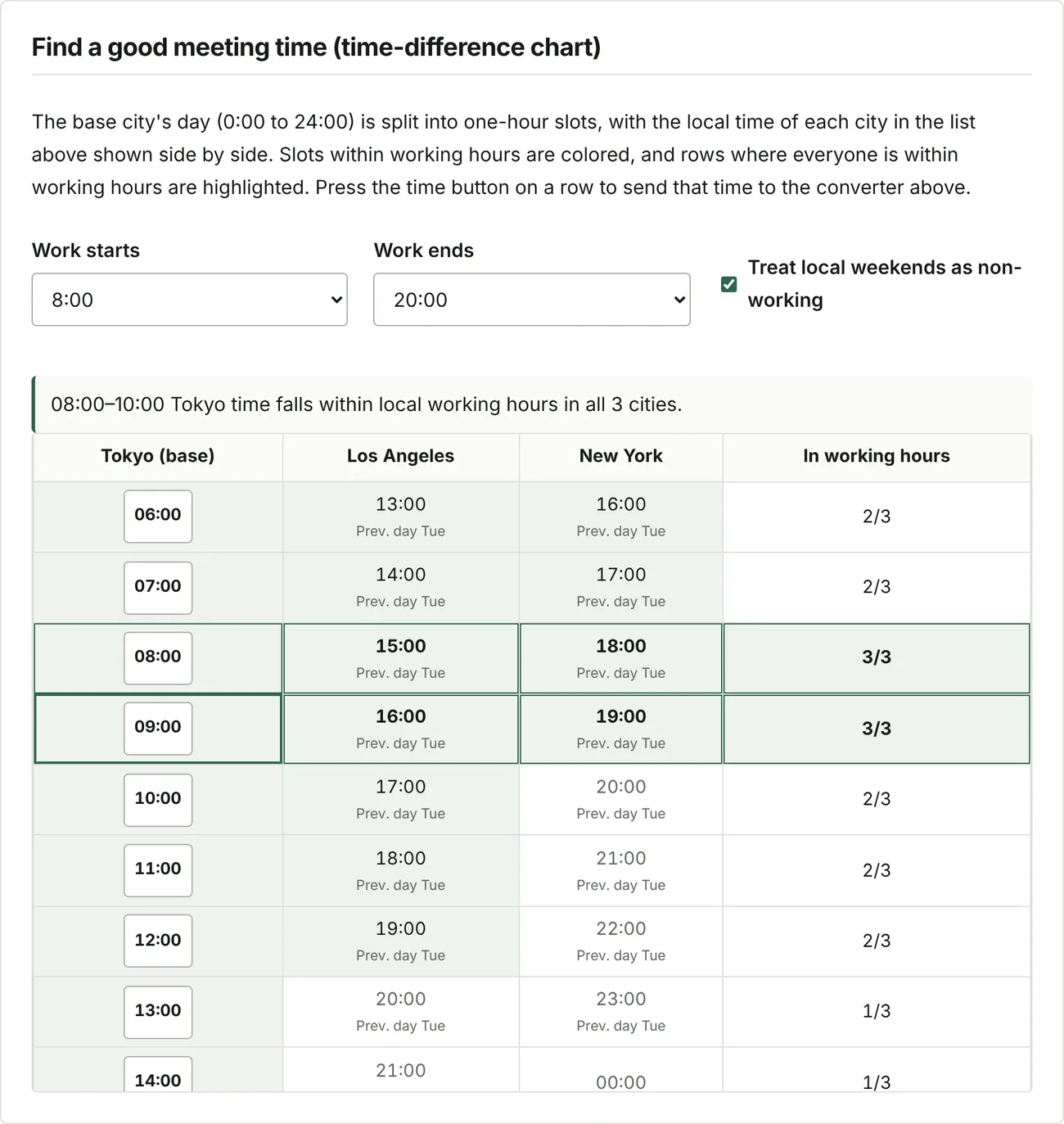
8:00 to 10:00 in Tokyo is 15:00 to 17:00 in Los Angeles and 18:00 to 20:00 in New York, so it is within working hours in all three cities. If Japan starts a little early and New York stays a little late, a weekly meeting is possible. Pressing a time button in the chart (for example 08:00) sends that time to the converter at the top of the page, where you can check each city’s date and time or copy them as text.
The work start and end times apply to every city, and a slot is colored if a one-hour meeting would finish by the end of working hours. With work ending at 18:00, the last slot within working hours starts at 17:00. Because “Treat local weekends as non-working” is checked, a slot such as Monday morning in Japan (Sunday afternoon or evening in the US) counts as outside working hours even if the hours themselves match. If you choose a Monday as the date, the US cities are not colored in the Tokyo morning slots.
I also tried London. With Tokyo and London only, and working hours of 9:00 to 18:00, there was no overlapping slot on December 9, 2026: 17:00 in Tokyo is 8:00 in London, before the working day starts. With the same settings on June 9, 2027, 17:00 to 18:00 Tokyo time was shown as within working hours in both cities. In summer London is on daylight saving time, its clocks are one hour ahead, and the difference from Japan shrinks to 8 hours. When you choose a meeting time, keep in mind that the answer depends on the season.
Why meeting times shift in March and November
In a regular meeting with New York or London, someone occasionally turns up an hour early, or joins an hour late, for just one week. Most of the time the cause is a daylight saving time change. “Upcoming daylight saving time changes” at the bottom of the page lists the days within one year of the selected date when clocks go forward or back in each city in the list.
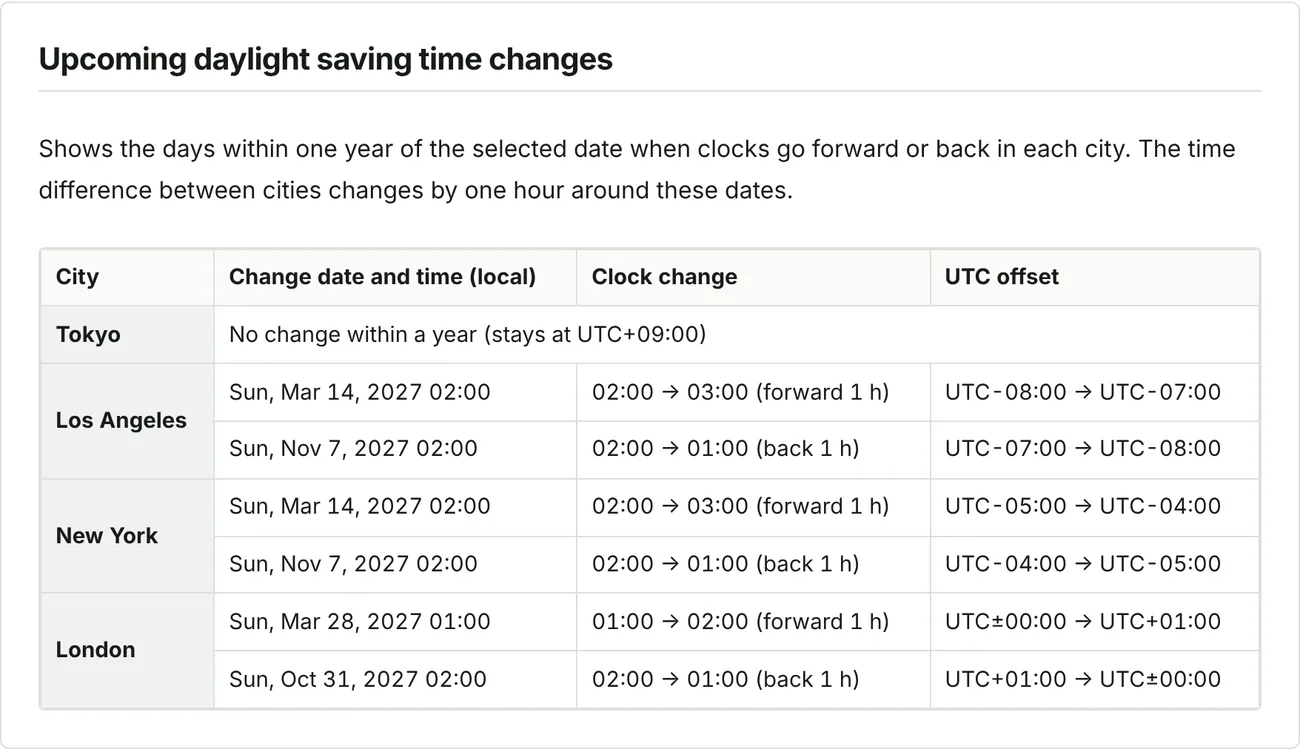
The US moves its clocks forward one hour on Sunday, March 14, 2027 and back on Sunday, November 7. London moves forward on Sunday, March 28 and back on Sunday, October 31. Because Japan does not observe daylight saving time, the difference between Japan and the US or the UK is one hour smaller while those countries are on summer time.
Take a regular meeting fixed at 9:00 on Wednesdays, Japan time. Before the change, 9:00 on Wednesday, March 10, 2027 is 19:00 on the previous day in New York and 16:00 in Los Angeles. Entering 9:00 on Wednesday, March 17, after the US has switched to daylight saving time, shows 20:00 EDT in New York and 17:00 PDT in Los Angeles. A meeting fixed in Japan time moves one hour later for the people in the US. Conversely, a meeting fixed at 19:00 on Tuesdays in New York moves from 9:00 to 8:00 on Wednesday for the people in Japan. Making sure every participant knows which city’s clock the meeting is anchored to makes the shift easier to spot.
The fact that the US and the UK change on different dates causes shifts too. For a meeting at 10:00 on Wednesdays in New York with participants in London, changing the date in the tool gives these London times:
| New York date and time | London | Tokyo |
|---|---|---|
| Wed, Mar 10, 2027, 10:00 EST | 15:00 GMT | Thu, Mar 11, 00:00 |
| Wed, Mar 17, 2027, 10:00 EDT | 14:00 GMT | Wed, Mar 17, 23:00 |
| Wed, Mar 31, 2027, 10:00 EDT | 15:00 BST | Wed, Mar 31, 23:00 |
For the two weeks from March 14 to March 27, the difference between New York and London is 4 hours instead of the usual 5. For the London participants, the meeting moves one hour earlier during just those two weeks. The same happens in autumn: in the week between London switching back on October 31 and the US switching back on November 7, the difference is again 4 hours. Calendar apps that send meeting invitations take these changes into account, but an email or chat message that says “15:00 London time” does not update itself. When you write out meeting times for March or for October and November, check the change dates in this table first.
In the southern hemisphere, Sydney and Auckland observe daylight saving time from around October to around April, the opposite of the northern hemisphere. If you add Sydney to the list, its forward and back dates are added to the table.
Times that do not exist, or occur twice, on the changeover day
On the day daylight saving time starts, clocks jump from 2:00 to 3:00. Entering 2:30 on Sunday, March 14, 2027 in Los Angeles displays a notice.
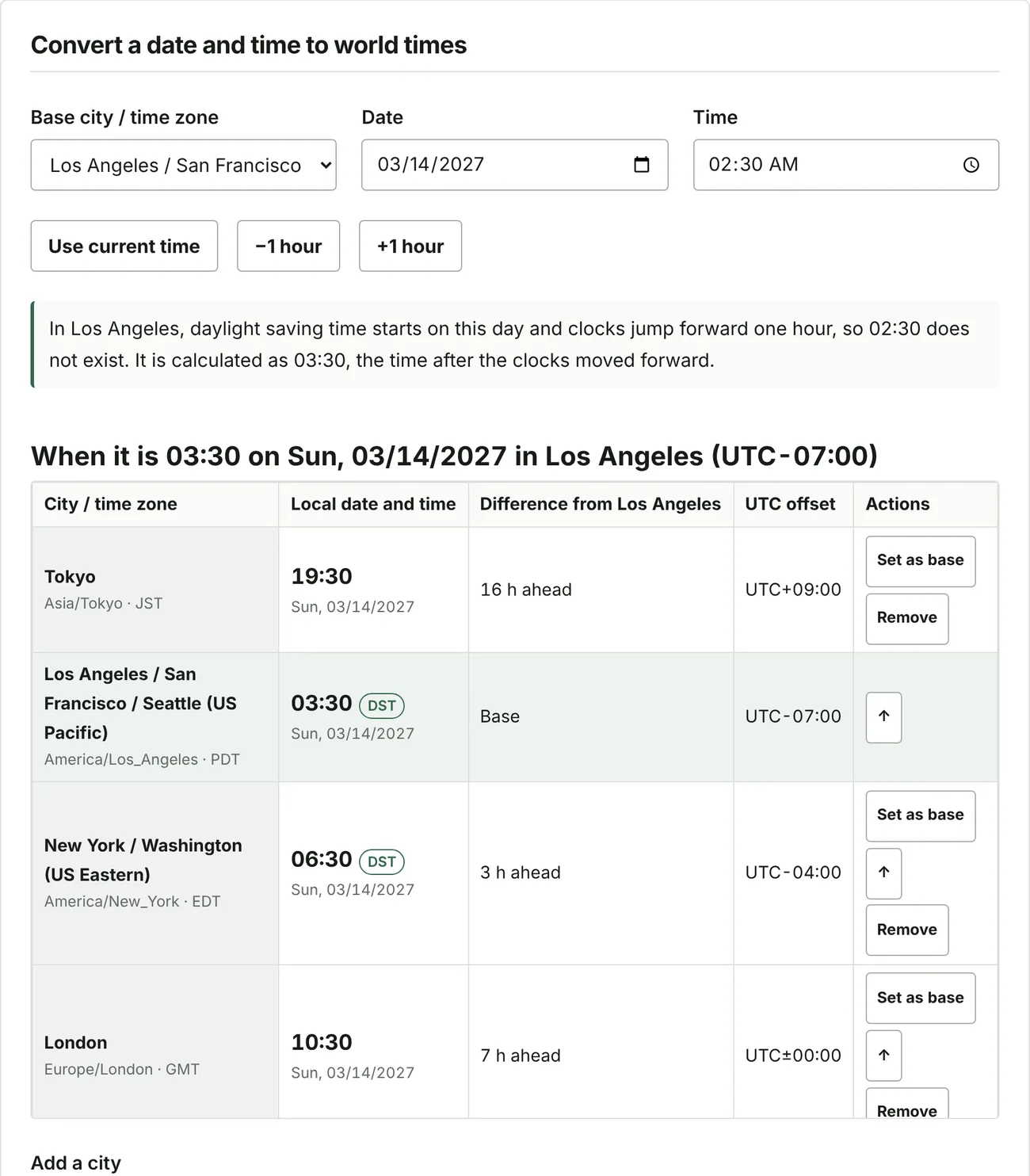
In Los Angeles, daylight saving time starts on this day and clocks jump forward one hour, so 02:30 does not exist. It is calculated as 03:30, the time after the clocks moved forward.
That is 19:30 in Japan. Conversely, on Sunday, November 7, when daylight saving time ends, 1:00 to 1:59 occurs twice. Entering 1:30 shows the notice “In Los Angeles, daylight saving time ends on this day and clocks fall back one hour, so 01:30 occurs twice.” together with a field for choosing which occurrence to use. The first (still on daylight saving time, PDT) is 17:30 in Japan; the second (after returning to standard time, PST) is 18:30. Because these are the small hours of the night, they rarely cause trouble for meetings. But if batch jobs or late-night maintenance are scheduled in local time, a job can be skipped or run twice during that hour. For checking scheduled server jobs in Japan time and UTC, see “Check the next weekday morning cron runs in Japan time and UTC”.
Where the data comes from, and how to share a result
Each city’s UTC offset and daylight saving rules come from the IANA time zone database (tz database) built into your browser. When a country or region changes its daylight saving rules, the change takes effect once an update to this database reaches your browser, so an old browser may not reflect recent changes. The dates and times you enter are never sent to a server; every calculation runs in your browser.
“Copy share URL” copies a URL that includes the base city, the date and time, and the cities in the list. Opening that URL shows the same combination, so you can send candidate meeting times to someone and let them check the times in their own zone. On this English page, the first city is the time zone of the person viewing it, so the person you send it to also sees their own local time at the top of the list.
Related tools and articles
To convert the 10-digit timestamps (Unix time) found in logs and API responses to Japan time and UTC, use the Unix Timestamp Converter. How to search logs by Japan time is covered in “Read Unix timestamps in JST and set the start of a log search”. When scheduled server jobs are configured in UTC, the Cron Planner shows when they will run next in Japan time. To count the days until a business trip or a deadline, use the Day Calculator.
Test environment
- Time Zone Converter (operated in the Japanese version; the screenshots were taken on the English page with the same dates and cities), Chromium (via Playwright, browser time zone Asia/Tokyo)
- Dates and cities were entered exactly as described in the text. The time-difference chart was checked for Wednesday, December 9, 2026, with working hours of 9:00–18:00 and 8:00–20:00 and “Treat local weekends as non-working” turned on. The daylight saving change dates are the 2027 dates shown by the tool.