How many /64 subnets fit in an IPv6 /56? Work out prefix ranges and tell fe80 from fd00 with a calculator
When your router receives a /56 IPv6 prefix, which addresses belong to you, and how many /64 LAN subnets can you take from it, with which numbers? This guide uses the IPv6 subnet calculator to find out, then shows how to convert between compressed and full notation, identify address types such as fe80:: (link-local) and fd00:: (ULA), and build the ip6.arpa name for reverse DNS, step by step with English UI screenshots.
Contents
If you open the IPv6 status page in your router’s admin screen, you may find a value such as 2001:db8:1234:5600::/56 under “Delegated prefix” or “Prefix Delegation”. This is the block of addresses your provider has given you, and the addresses handed out on your home or office LAN are carved out of it. When you want separate VLANs for guest Wi-Fi or security cameras, the first things you need to know are “where does this /56 start and end?” and “how many /64s, one per LAN, can I take from it, and what is each one called?”
With IPv4 you have a feel for counting how many devices fit in a /26. IPv6 addresses, however, are 128 bits long and are abbreviated with ::, which makes it hard to follow a range in your head. In this article we use the IPv6 subnet calculator to confirm the range of a /56 and how to split it into /64s, and then identify what addresses starting with fe80:: or fd00:: actually are. All calculations run in your browser, and the addresses you enter are not sent anywhere.
The example address is 2001:db8:1234:5678:abcd::1, taken from 2001:db8::/32, which is reserved for use in documentation. When you check your own network, replace it with the address shown on your router or device. RFC 3849
Find the range of a /56 and how many /64s it holds
Suppose your router shows /56 and a device on the LAN has the address 2001:db8:1234:5678:abcd::1. From this device’s address and the prefix length, we work out the range of the whole /56.
- Enter
2001:db8:1234:5678:abcd::1in theInspect single IPv6 addressfield. - Enter
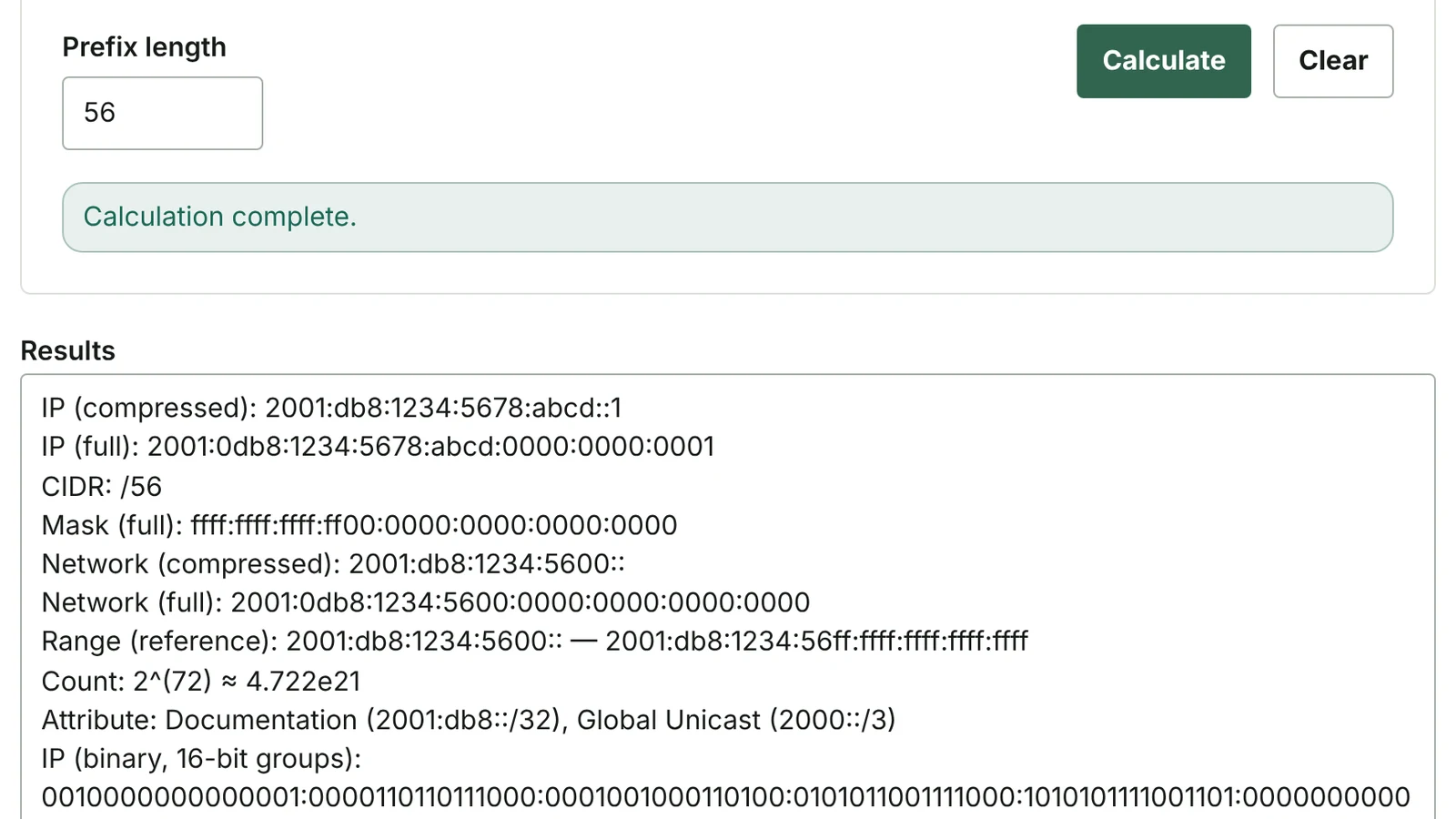
56inPrefix lengthand clickCalculate. - The results show the network as
2001:db8:1234:5600::and the range as2001:db8:1234:5600::to2001:db8:1234:56ff:ffff:ffff:ffff:ffff.
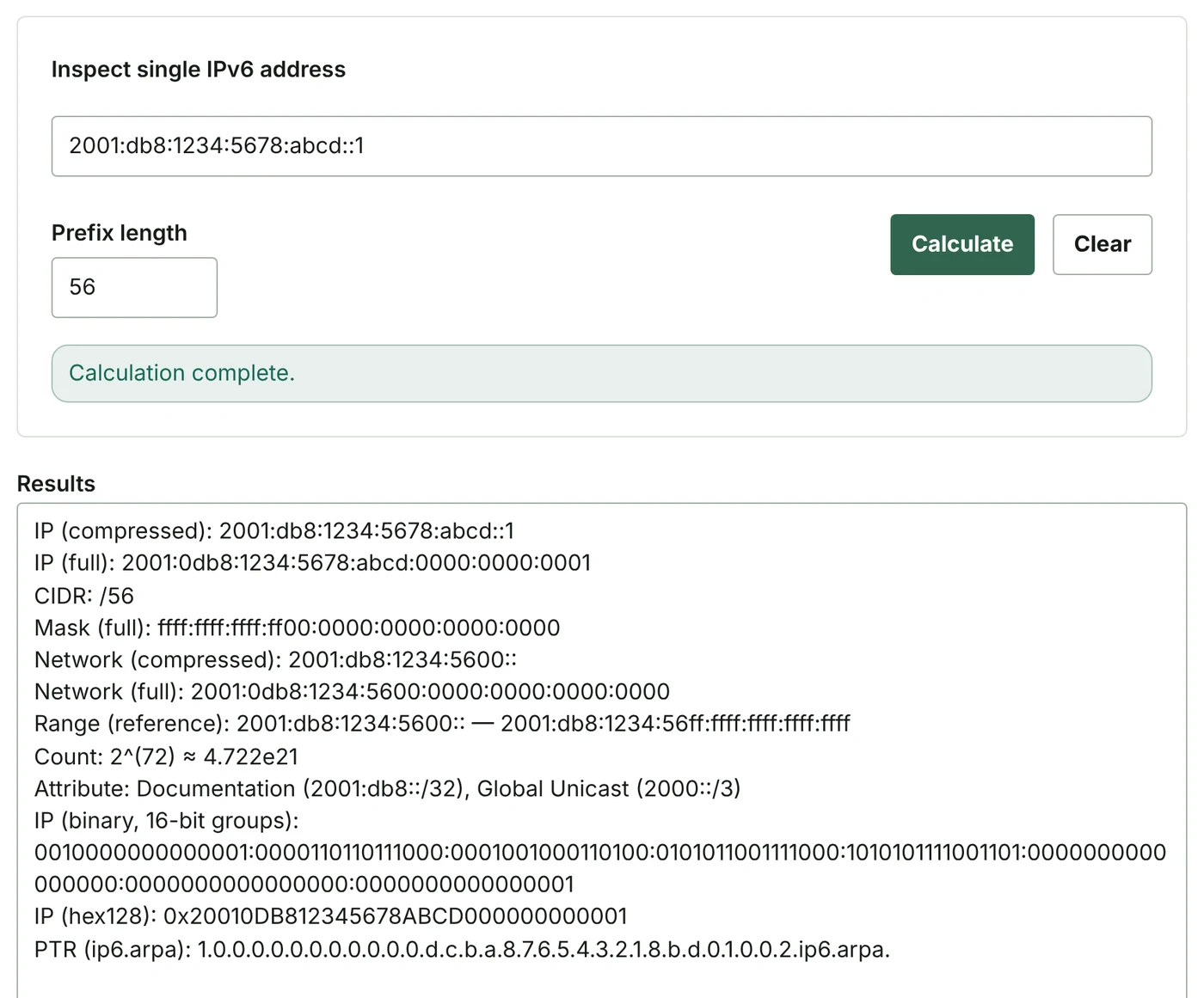
The Mask (full) in the results is ffff:ffff:ffff:ff00:0000:0000:0000:0000. An IPv6 address is written in hexadecimal as eight groups of 16 bits, so each group has four hex digits and each digit is 4 bits. A /56 means the first 56 bits, that is three groups plus two digits, are fixed by the provider, and everything from the last two digits of the fourth group onward is yours to use. Comparing the two ends of the range, you can see 5600 moving up to 56ff.
The /64s you use for LANs are carved out by numbering those last two digits from 00 to ff. Two digits are 8 bits, so you get 2⁸ = 256 /64s. The example device sits in the /64 numbered 78; if you recalculate with prefix length 64, the network becomes 2001:db8:1234:5678::. To split VLANs, decide on numbers such as the following and configure them on the router’s interfaces.
| Purpose | /64 prefix |
|---|---|
| Existing LAN | 2001:db8:1234:5600::/64 |
| Guest Wi-Fi | 2001:db8:1234:5601::/64 |
| Security cameras | 2001:db8:1234:5602::/64 |
| (and so on) | … |
| The last one | 2001:db8:1234:56ff::/64 |
With a /48 allocation you can use the entire fourth group (16 bits), giving 65,536 /64s; with a /60 you have only the last digit (4 bits), giving 16. In each case you can confirm this by changing the prefix length and seeing which digits of the range move. How much of the /56 received from the provider the router can hand out to the LAN side, however, depends on the model and its settings. Once you have decided on the numbers, check your router’s manual to see whether it can assign multiple /64s.
The 2^(72) ≈ 4.722e21 in the Count field is the number of addresses in the whole /56. With IPv6 it is more practical to think in terms of “how many bits are left” rather than the count. The range is labeled Range (reference) because IPv6 has no broadcast address like IPv4, and the last address has no special role. On the other hand, the first address of each subnet (an address whose interface ID is all zeros, such as 2001:db8:1234:5678::) is defined as the Subnet-Router anycast address, so avoid assigning it to a device manually. RFC 4291 2.6.1
Convert between compressed and full notation
The top two lines of the results are the same address written in two ways.
IP (compressed):2001:db8:1234:5678:abcd::1IP (full):2001:0db8:1234:5678:abcd:0000:0000:0001
Compressed notation drops the leading zeros in each group and replaces one run of two or more all-zero groups with ::, only once. A single zero group is written as 0, not ::. The tool’s compressed output follows this recommended rule (RFC 5952), so you can use it to keep the notation of addresses consistent in configuration files and documents. RFC 5952
When you compare firewall rules and logs, devices may abbreviate addresses differently, so the same address may not match as a string. Converting to full notation lines up the digits, so use IP (full) when you put addresses side by side in a spreadsheet. You can also enter addresses whose last part is written in IPv4 form, such as the IPv4-mapped address ::ffff:192.0.2.1; the result is shown converted to hexadecimal as ::ffff:c000:201.
Sizing by required address count is only for links other than LANs
The VLSM helper at the top of the tool suggests the smallest prefix length for a required number of addresses. Enter 1000 in Required addresses and click Suggest, and it shows /118 (2¹⁰ = 1,024 addresses).
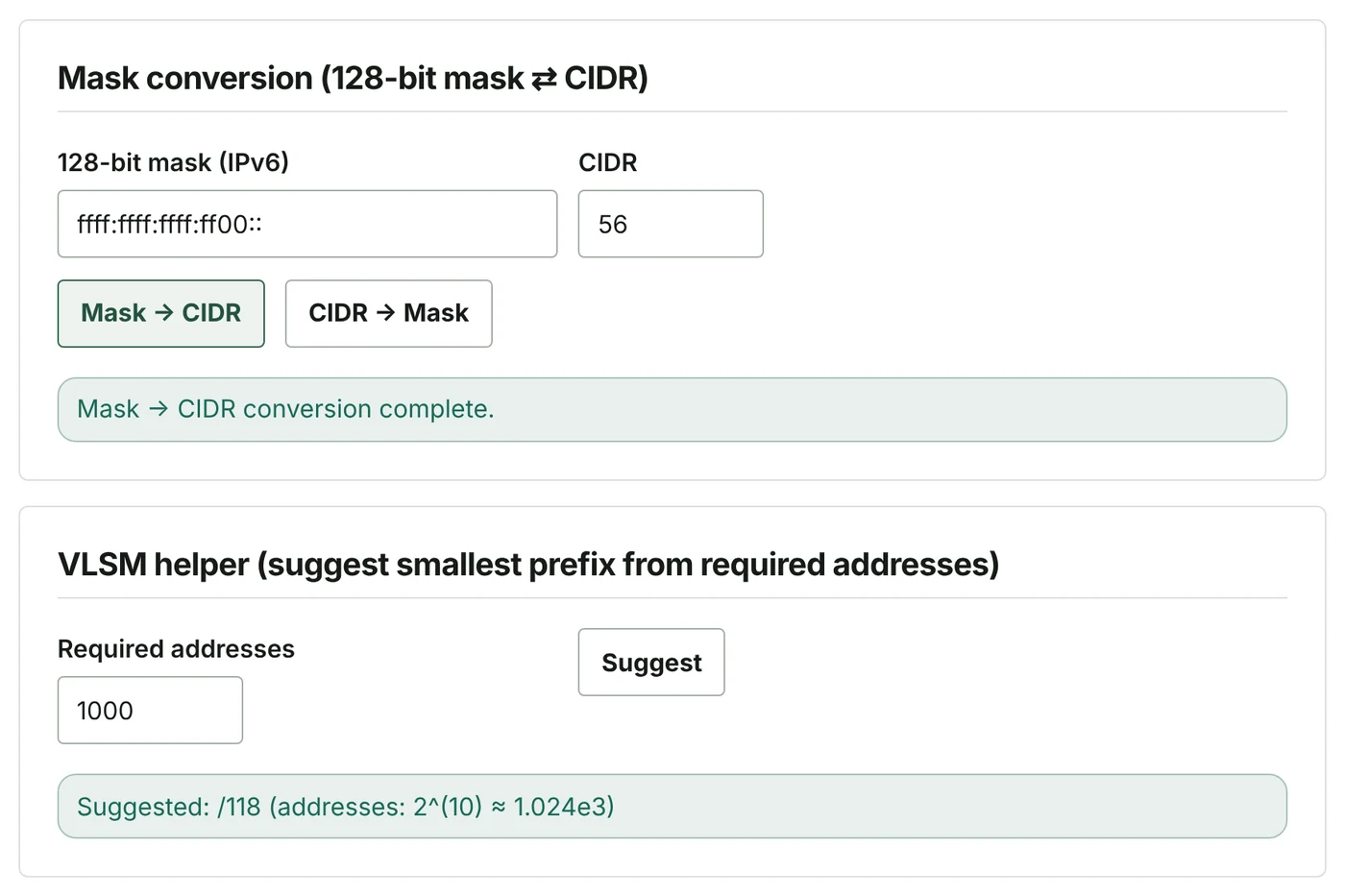
The calculation is correct, but making a LAN with devices on it a /118 is not recommended. IPv6 unicast addresses are designed to use the last 64 bits as the interface ID as a rule, and SLAAC, with which devices create their own addresses, assumes a /64 prefix. Whether a LAN has 3 devices or 1,000, the standard practice is to assign a /64 to the segment. RFC 4291 2.5.1, RFC 7421
The suggested value is useful where SLAAC is not used, such as links between routers or ranges for manually addressed servers. For example, entering 2 suggests /127, and using /127 on point-to-point links between routers is permitted by RFC 6164. RFC 6164
Mask conversion on the same screen is for when you come across devices or documents that write IPv6 masks as ffff:ffff:ffff:ff00::. Enter the mask and click Mask → CIDR to get 56; conversely, enter a prefix length and click CIDR → Mask to get the mask in full notation. A value such as ffff:ffff:ffff:ff0f::, where ones and zeros switch back partway, is not a valid mask and produces an error.
Identify addresses that start with fe80, fd00 or ff02
In the output of ip -6 addr or ipconfig, you will often see several IPv6 addresses on a single interface. Which one is used for communicating with the internet can be told from the first few digits. The Attribute field in the results shows this classification.
For example, calculating fe80::1 with prefix length 64 shows Link-Local (fe80::/10) under Attribute.
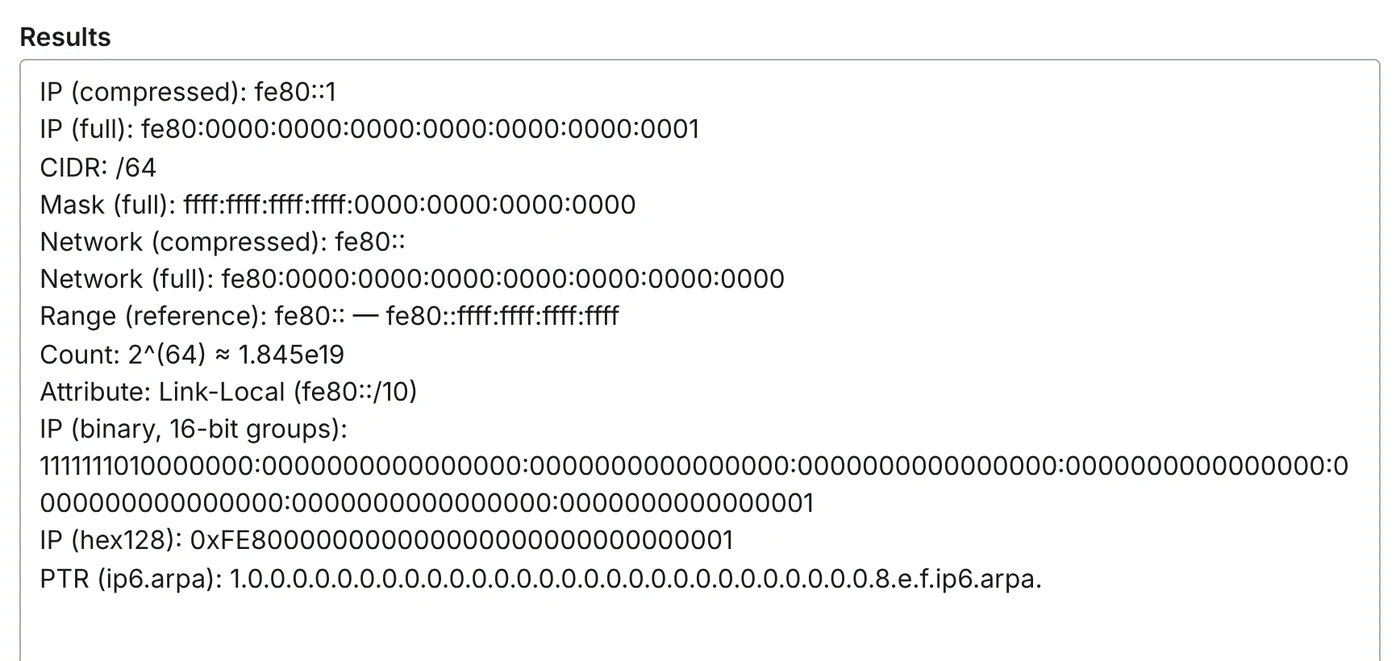
For commonly seen addresses, the tool’s classification and what it means are summarized below.
| Example input | Attribute shown |
Meaning |
|---|---|---|
fe80::1 |
Link-Local (fe80::/10) |
An address used only within the same link. Assigned automatically to each interface. RFC 4291 2.5.6 |
fd12:3456:789a::1 |
Unique Local (fc00::/7) |
An address for use within an organization (ULA). Intended to be used without advertising routes to the internet. RFC 4193 |
ff02::1 |
Multicast (ff00::/8) |
Multicast. ff02::1 is addressed to all nodes on the same link. |
::ffff:192.0.2.1 |
IPv4-mapped (::ffff:0:0/96) |
An IPv4 address expressed in IPv6 form. It can appear in server logs. |
2001:db8:1234:5678:abcd::1 |
Documentation (2001:db8::/32), Global Unicast (2000::/3) |
A range for examples. For a real global address, only Global Unicast is shown. |
ULAs starting with fd play a role similar to IPv4 private addresses (such as 192.168.0.0/16), but the 40 bits following fd (the Global ID) are supposed to be chosen at random. If you simply use an easy-to-remember value such as fd00::, it is likely to collide when you connect your network with another organization’s.
To check your own address as seen from the internet, display your connection’s source IP with the IP address checker, then enter that value in this tool to identify its type.
Build the ip6.arpa name for reverse DNS
To set up reverse DNS (a PTR record) for a server’s address, you use a name made by writing the address one hex digit at a time in reverse order and appending ip6.arpa.. Rearranging 32 digits by hand is error-prone, so copy the PTR (ip6.arpa) field from the results. RFC 3596
For 2001:db8:1234:5678:abcd::1, the PTR name is as follows.
1.0.0.0.0.0.0.0.0.0.0.0.d.c.b.a.8.7.6.5.4.3.2.1.8.b.d.0.1.0.0.2.ip6.arpa.
If your provider has delegated reverse DNS for your /56 to you, the zone name is the last 14 digits (56 ÷ 4) of the PTR name: 6.5.4.3.2.1.8.b.d.0.1.0.0.2.ip6.arpa.. Reverse delegation is cut in 4-bit units, so /56, /60 and /64 become zones as they are, but prefix lengths not divisible by 4, such as /57, are awkward to handle. If you keep prefix lengths at multiples of 4 when splitting subnets, the boundaries line up with digits both in notation and in reverse DNS.
Before using the results in your configuration
What the tool gives you is the range and type classification derived from the address and prefix length you entered. How many bits of prefix your provider actually delegates, and whether that prefix is static or may change, must be confirmed from the router’s display or your contract. If the delegated prefix changes when you reconnect, deciding the /64 numbers in advance (00 to ff in the example) lets you renumber with the same numbers even when the leading part changes.
Click Copy to paste the results exactly as the text is displayed. When recording them in design notes, combining Network (compressed) and CIDR as in 2001:db8:1234:5600::/56 makes them easy to read later.
If you are designing the IPv4 side with the same steps, How to use the IPv4 subnet calculator shows how to choose a prefix from the number of hosts required. If you would like to read about the differences between IPv4 and IPv6 themselves in a conversational format, Learning IPv6 through Dialogue is also useful.