What Is the Pre-Tax Price of ¥1,000? Why Dividing by 1.1 Is Off by ¥1, and How Japanese Qualified Invoices Round Tax Once per Rate
¥1,000 divided by 1.1 is ¥909.09…, and when Japan's consumption tax is rounded down, no pre-tax price comes to exactly ¥1,000 including tax. Using the Japanese Consumption Tax Calculator, I check how to work back to a pre-tax price for a price tag, how Japan's Qualified Invoice System rounds tax once per rate, and how many yen line-by-line rounding is off.
Japan’s consumption tax works much like VAT or GST: a business adds it to the price, and the customer pays the total. The standard rate is 10%, and food and drink other than alcohol and eating out are taxed at a reduced 8%. Prices are in whole yen, because Japan has no smaller currency unit in everyday use, so whenever the tax is not a whole number of yen it has to be rounded.
Calculating the tax itself takes one multiplication. ¥1,000 before tax means ¥100 of tax and ¥1,100 in total. The trouble starts when you calculate in the other direction, and when there are fractions of a yen.
Say a shop wants a price tag of ¥1,000 including tax and needs to set the pre-tax price. 1,000 divided by 1.1 is ¥909.0909…. A pre-tax price of ¥909 gives ¥999 with tax, and ¥910 gives ¥1,001; neither makes ¥1,000. On the invoicing side, the tax that a spreadsheet calculates line by line and adds up can differ from the figure in accounting software by a few yen.
Besides converting between tax-inclusive and pre-tax prices, the Japanese Consumption Tax Calculator can work back from a price tag and total an invoice by tax rate following the rules of Japan’s Qualified Invoice System. Here I enter both of the situations above and check where the ¥1 differences come from.
From a pre-tax price to a tax-inclusive price
When the page opens, the first section, “Calculate the tax-inclusive price”, already contains a pre-tax price of ¥1,000. The tax rate defaults to “10% (standard rate)” and tax fractions to “Round down”. In this state the page already shows ¥1,100 including tax and ¥100 of tax. Change the amount and the result updates without pressing a button.
The amount field accepts 1980 as well as 1,980, ¥1,980 and the full-width digits 1980 used in Japanese text, so you can paste amounts copied from an invoice or a web page.
If the pre-tax price ends in 0, 10% of it is always a whole number of yen. The rounding choice only changes the result when the last digit is not 0, or when you calculate at 8%. 8% of ¥198 is ¥15.84: ¥15 when rounded down, ¥16 when rounded half up or up. The “Comparison by tax rate and rounding” table below the result lists every combination of 10% and 8% with the three rounding methods, so you can compare them at a glance.
Japanese law does not prescribe a single way to round fractions of a yen in the tax. For the qualified invoices described below, Japan’s National Tax Agency (NTA) says businesses may round up, round down or round half up (NTA Invoice Q&A, question 57, in Japanese). Check which method your shop or company uses before choosing.
Dividing ¥1,000 by 1.1 does not settle the pre-tax price
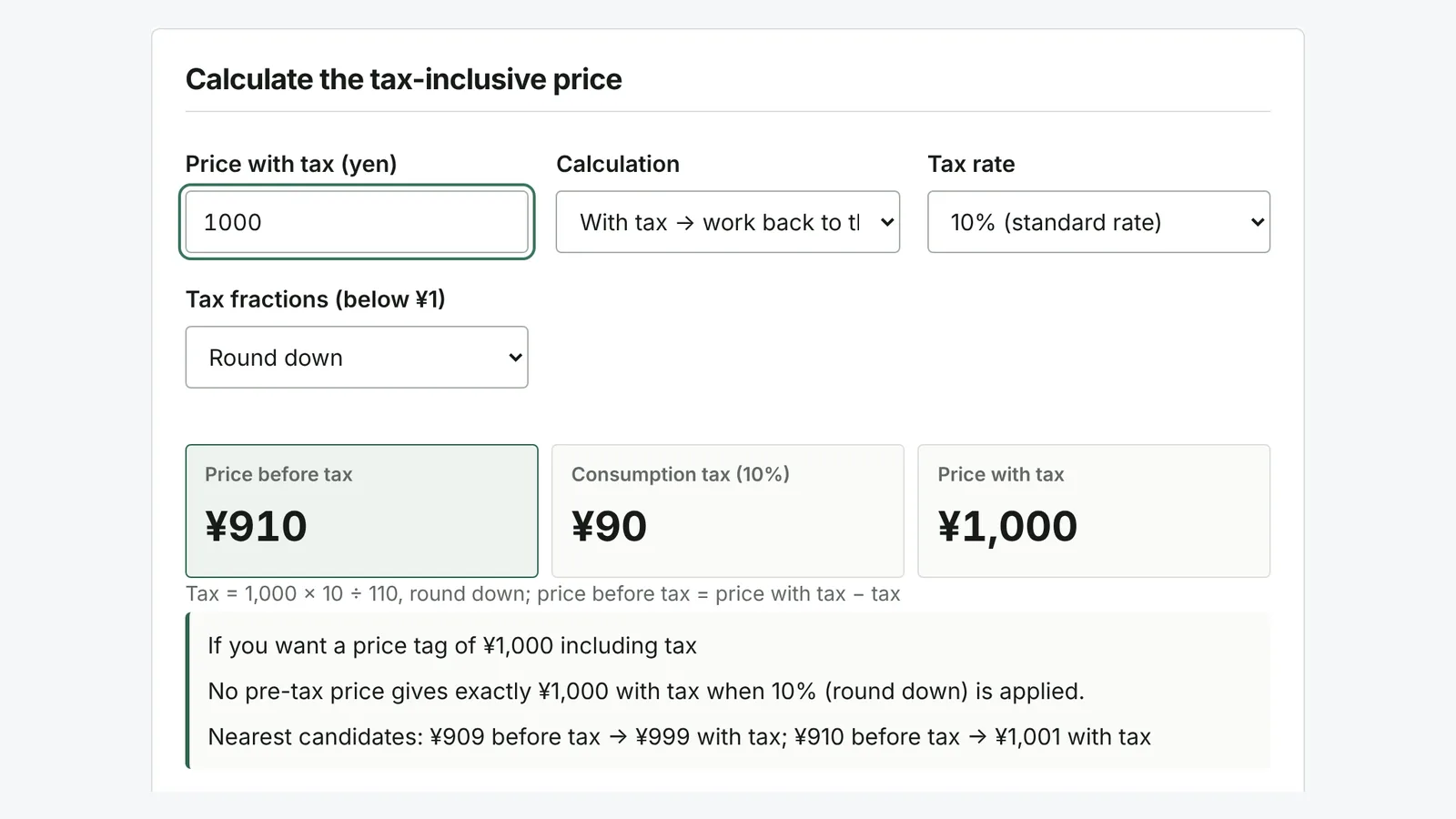
To calculate in reverse, switch “Calculation” to “With tax → work back to the price before tax”. The label of the amount field changes to “Price with tax (yen)”. This is the result after entering 1000.
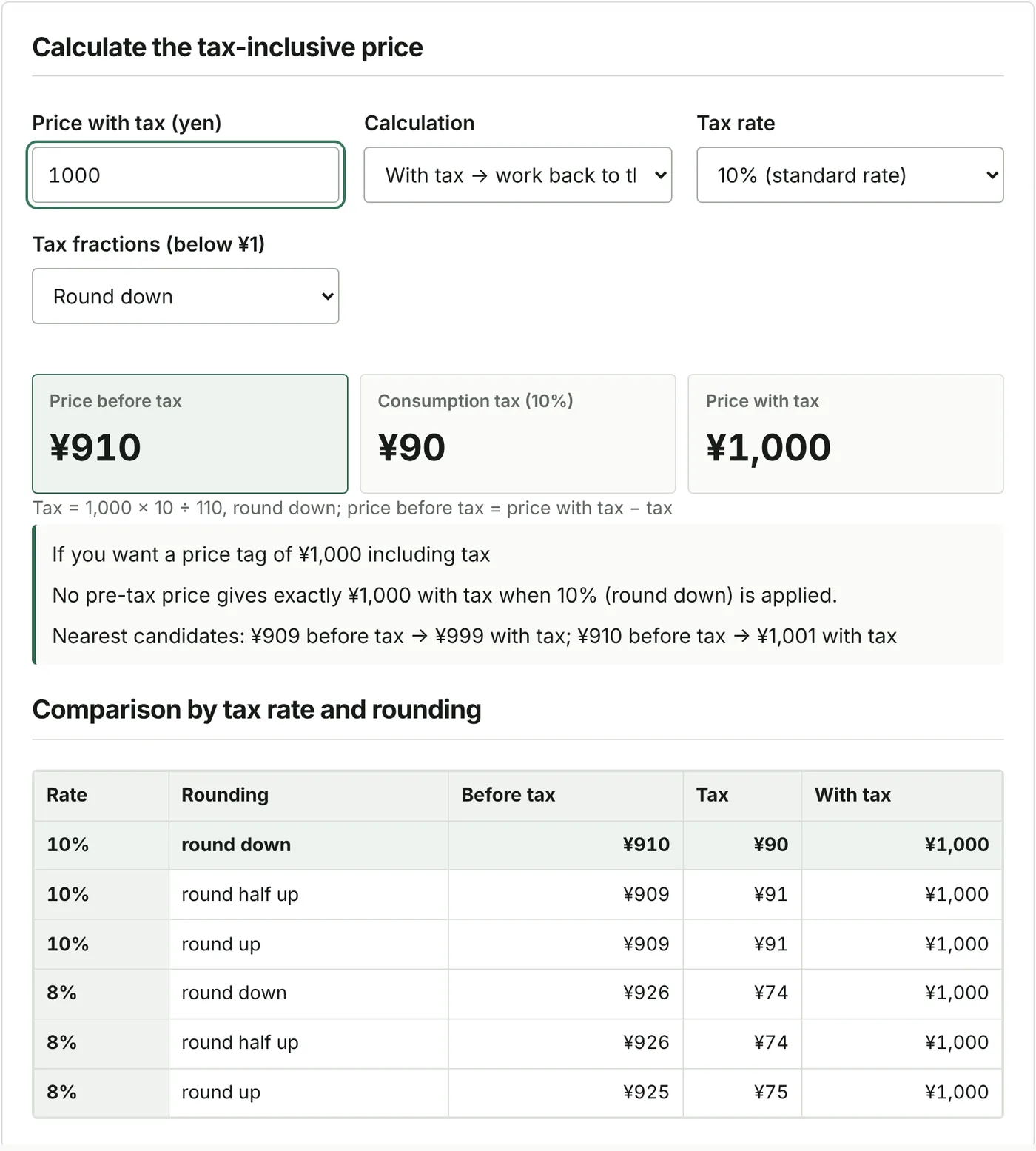
The tool first finds the tax contained in the tax-inclusive price as “price with tax × 10 ÷ 110”. 1,000 × 10 ÷ 110 is ¥90.90…, which rounds down to ¥90. Subtracting ¥90 from ¥1,000 gives the pre-tax price of ¥910 shown on the screen.
But 10% of ¥910 is ¥91, so the tax-inclusive price becomes ¥1,001. That is why going back does not return the same ¥1,000. Below the result, under “If you want a price tag of ¥1,000 including tax”, the tool says that at 10% with rounding down no pre-tax price gives exactly ¥1,000 with tax, and lists the nearest candidates: “¥909 before tax → ¥999 with tax” and “¥910 before tax → ¥1,001 with tax”.
Working back from the tax-inclusive price and working forward from the pre-tax price disagree because the tax is rounded in both directions. 10% of ¥909 is ¥90.9 and 10% of ¥910 is ¥91. With rounding down, ¥909 carries ¥90 of tax and totals ¥999, while ¥910 carries ¥91 and totals ¥1,001. No pre-tax price lands on the ¥1,000 in between.
The comparison table shows that with rounding half up or rounding up, ¥909 before tax does give ¥1,000 with tax (the ¥90.9 of tax on ¥909 goes up to ¥91). At the reduced 8% rate, ¥926 before tax gives ¥1,000 with rounding down or half up, and ¥925 with rounding up.
¥500 including tax cannot be reached exactly with rounding half up (it can with ¥455 when rounding down, or ¥454 when rounding up). ¥980, on the other hand, cannot be reached with rounding up. Whether a price comes out exactly depends on the combination of the tax-inclusive price and the rounding method, so when setting price tags it is quicker to check each price.
Price tags must show the tax-inclusive price
In Japan, prices shown to consumers on price tags, flyers and websites must include consumption tax, a rule called sōgaku hyōji (total price display). The NTA’s Tax Answer page gives “¥11,000”, “¥11,000 (tax included)” and “¥11,000 (¥10,000 before tax)” as examples that satisfy the rule (No. 6902, mandatory total price display, in Japanese).
For shops that want round tax-inclusive prices, the missing pre-tax price for exactly ¥1,000 shows up when they print the pre-tax price alongside, or when they register items in a POS register by their pre-tax price. If the register rounds the tax down, an item registered at ¥909 rings up at ¥999, and one registered at ¥910 rings up at ¥1,001.
Invoice tax is rounded once per rate, on the totals
Under Japan’s Qualified Invoice System, which started in October 2023, a qualified invoice (tekikaku seikyūsho) must show the total amount for each tax rate and the consumption tax for each rate. Fractions of a yen in the tax are rounded only once per rate on each qualified invoice. Calculating and rounding the tax item by item and then adding it up is not allowed (NTA Invoice Q&A, question 57, in Japanese).
How much difference does line-by-line calculation make? The tool’s second section, “Total the consumption tax on an invoice or receipt by rate (qualified invoices)”, comes pre-filled with line items modeled on a Japanese supermarket receipt. If you delete them, press “Load example” to bring them back.
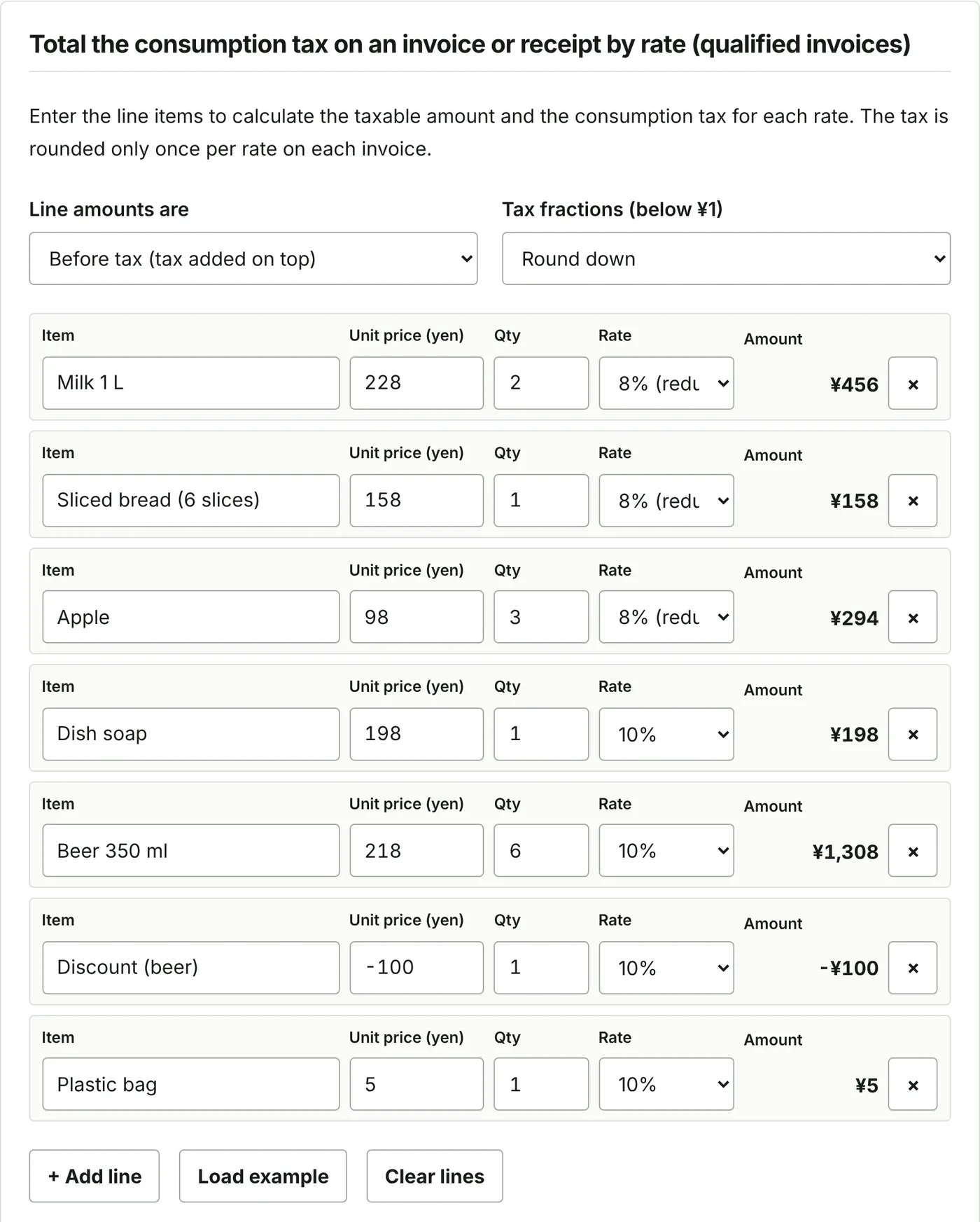
The lines are pre-tax amounts. Milk, bread and apples are taxed at 8% as food; dish soap, beer and the plastic bag at 10% (alcohol does not qualify for the reduced rate). The ¥100 discount on the beer is a 10% line with a unit price of -100.
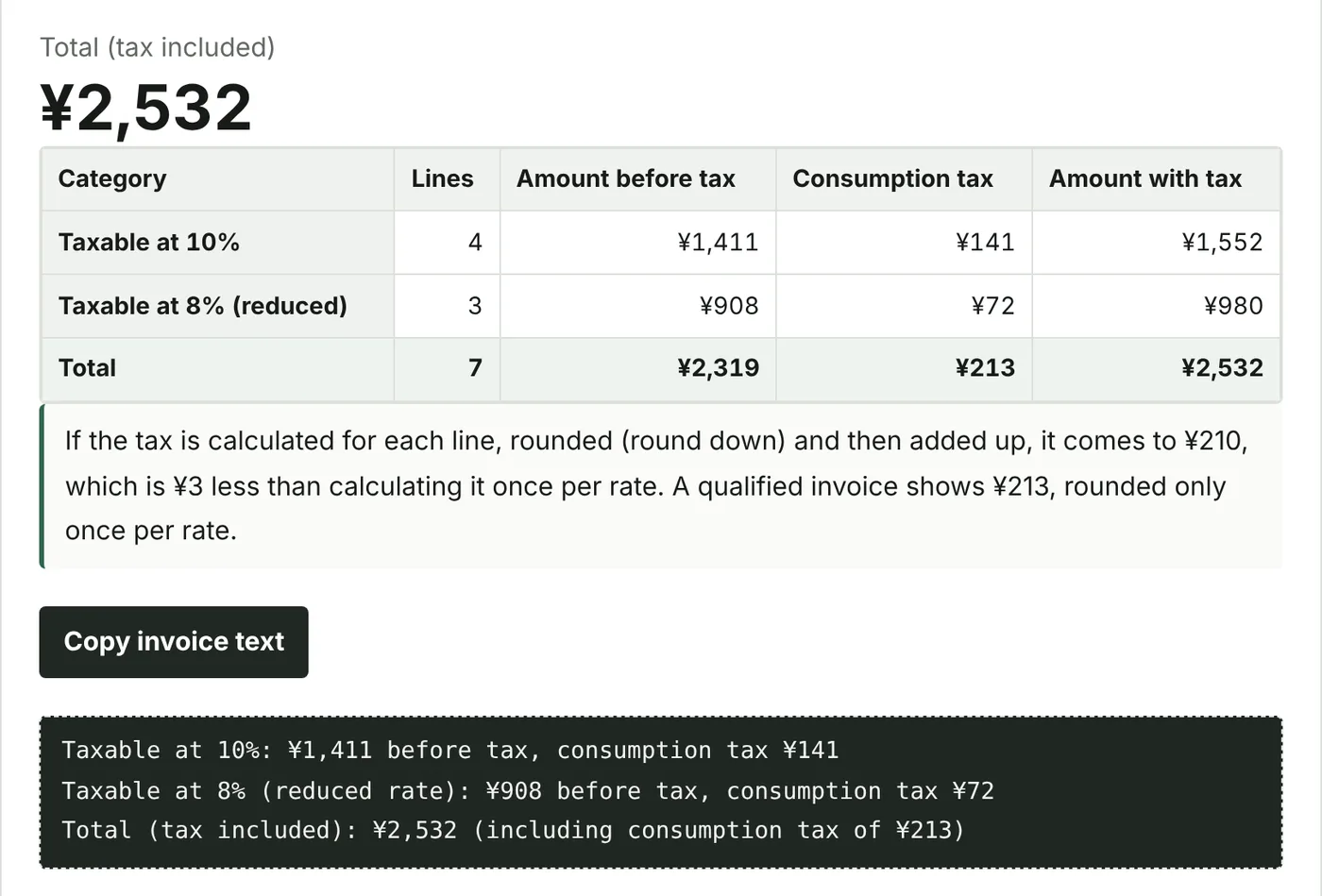
The 10% lines total ¥1,411; 10% of that is ¥141.1, so the tax is ¥141. The 8% lines total ¥908; 8% of that is ¥72.64, so ¥72. The tax comes to ¥213 and the amount to pay to ¥2,532.
Below the table the tool says that calculating the tax for each line, rounding it down and adding it up gives ¥210, ¥3 less than calculating it once per rate. Taking the three 8% lines one at a time, milk at ¥456 is ¥36.48 → ¥36, bread at ¥158 is ¥12.64 → ¥12, and apples at ¥294 are ¥23.52 → ¥23, for a total of ¥71 — ¥1 less than the ¥72 calculated on the combined ¥908. On the four 10% lines, the dish soap’s ¥19.8 becomes ¥19, the beer’s ¥130.8 on ¥1,308 becomes ¥130 and the plastic bag’s ¥0.5 becomes ¥0; with the −¥10 from the discount that makes ¥139, ¥2 less than the combined ¥141. The fractions dropped on each line add up to ¥3 across seven lines. If your spreadsheet rounds the tax on each line with ROUNDDOWN and adds the results, this difference goes straight onto the invoice.
Change the rounding to “Round half up” and the tax is ¥214 calculated once per rate and ¥215 line by line, so this time line-by-line calculation is ¥1 higher. Which way it goes depends on the lines; there is no fixed tendency.
Press “Copy invoice text” to copy the text shown below the table to the clipboard. You can paste it into the totals area of an invoice template.
Taxable at 10%: ¥1,411 before tax, consumption tax ¥141
Taxable at 8% (reduced rate): ¥908 before tax, consumption tax ¥72
Total (tax included): ¥2,532 (including consumption tax of ¥213)
If the unit prices on the invoice include tax, set “Line amounts are” to “Tax included”. The tool then works back the tax from the tax-inclusive total for each rate with “× 10 ÷ 110” and “× 8 ÷ 108”. Pre-tax and tax-inclusive amounts cannot be mixed on one invoice, so use one or the other throughout. For items with no consumption tax, such as expenses paid on the customer’s behalf or Japanese revenue stamps, choose “Not taxable” as the rate: they are included in the total but left out of the tax calculation.
The tool handles only the amount of consumption tax. It does not calculate the income tax that Japanese clients withhold from payments to freelancers, or the consumption tax a business pays when it files its tax return.
Converting a whole price list to tax-inclusive prices
To change all the prices on a menu or product list, use the third section, “Convert a price list in one go”. Paste one amount per line into “List of amounts” and the tool calculates the pre-tax price, the tax and the tax-inclusive price for each line. For a line with an item name followed by a price, such as Blend coffee 450, the number at the end of the line is read as the amount. You can copy two columns of item names and prices from Excel and paste them as they are.
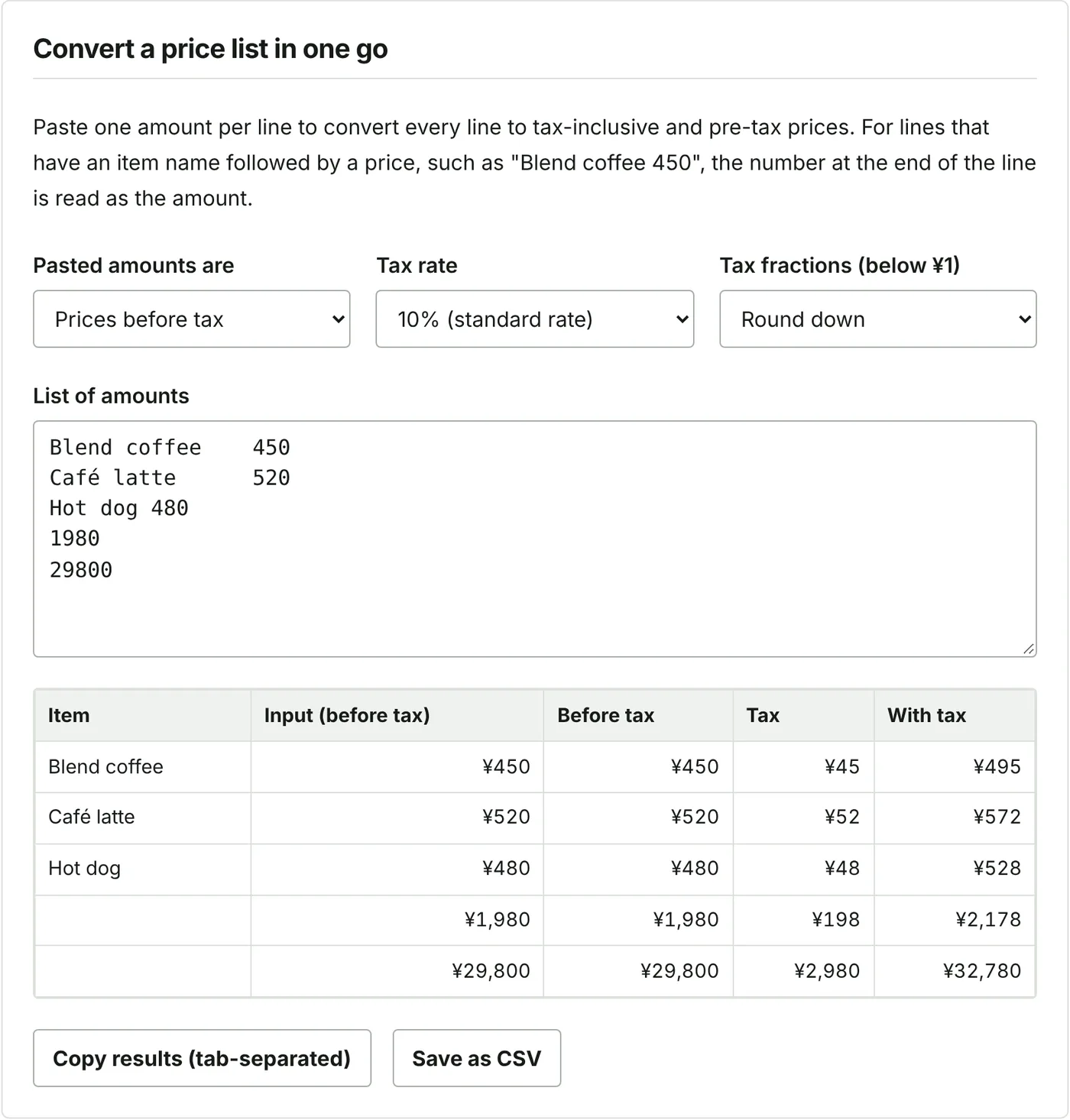
“Copy results (tab-separated)” copies the results so they paste into Excel or a spreadsheet. “Save as CSV” saves UTF-8 with a BOM, so the text displays correctly when the file is opened in Excel.
This section rounds each line separately. It is meant for pricing items one by one, not for invoice totals; use the invoice section above for invoices.
Trying out a 1% rate on food from April 2027
As of November 2026, when this article was written, a bill to cut the consumption tax rate on food and drink to 1% for two years is before Japan’s parliament (the Diet). Based on the outline approved by the cabinet on September 15, 2026, the NTA has published a Q&A and a leaflet on how the cut would be handled if the bill passes. According to them, the cut would run from April 1, 2027 to March 31, 2029, cover the same food and drink that is now taxed at 8%, and set the combined national and local rate at 1%. Newspaper subscriptions, now taxed at 8%, would not be included (NTA Q&A on the two-year rate cut for food and drink, leaflet, both in Japanese). Whether the bill passes, and whether its content changes, depends on the Diet’s deliberations.
The tool’s “Tax rate” menu offers only 10% and 8%, but choosing “Enter another rate” opens a field for any rate. With 1 entered, a pre-tax price of ¥98 gives ¥0 of tax and ¥98 including tax when rounding down. The comparison table shows that rounding half up or up gives ¥1 of tax and ¥99 including tax. At a 1% rate, whether an item under ¥100 carries ¥0 or ¥1 of tax depends on the rounding method.
Invoices are affected in the same way. Three items at ¥98 before tax at 1% with rounding down carry ¥0 of tax each when calculated one by one, but ¥2 when calculated on the combined ¥294. The lower the rate and the smaller the tax, the larger the difference from line-by-line calculation becomes relative to the tax.
For now, though, the rate menu in the invoice section has only three choices — “10%”, “8% (reduced)” and “Not taxable” — so 1% lines cannot be entered there. To try a 1% invoice, apply 1% to the total for each rate in the “Calculate the tax-inclusive price” section above.
Related tools and articles
If your accounting or sales management software limits how many rows it can import at once, the CSV Splitter can split the converted price list. The steps are described in “Split freee Sales product master CSV files into batches of 999”. To count the days until an invoice is due, use the Day Calculator.
For other money calculations, the Loan Repayment Calculator compares monthly mortgage payments and interest. How to use it is covered in “Shorten the Term or Lower the Payment? How Much Interest a Mortgage Prepayment Saves”.
Test environment
- Japanese Consumption Tax Calculator (operated on the English page), Chromium (via Playwright)
- The figures on screen use the tool’s initial values and the lines from “Load example”; the reverse calculation uses ¥1,000 including tax, and the 1% trial uses 1 in “Enter another rate”