Converting curl commands to Python requests or JavaScript fetch: why JSON sent with -d arrives as a form, and what shifts when you rewrite by hand
How to turn a curl example from API documentation, or a request copied with “Copy as cURL” in the developer tools, into Python requests or JavaScript fetch code. I sent the original curl and the code produced by the curl Command Converter to a local server that records every request it receives, and compared them: JSON passed with -d goes out as application/x-www-form-urlencoded, a hand-written data= or fetch call changes the Content-Type, redirects behave differently without -L, and Windows cmd-style commands need to be read differently.
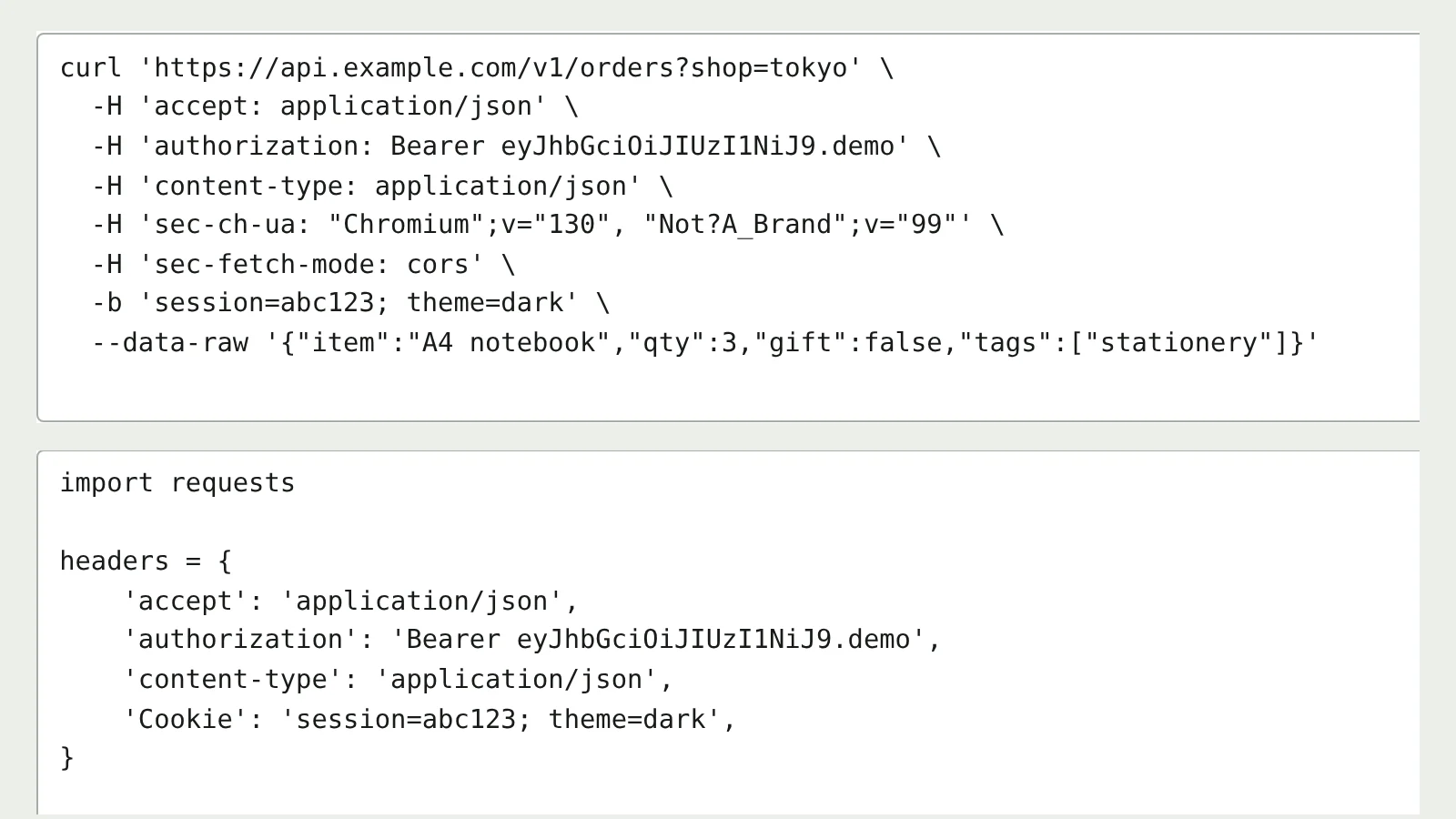
API documentation usually shows its examples as curl commands. When I want to reproduce, from my own script, a request that a web page makes in the browser, “Copy as cURL” in the developer tools also hands me a curl command. That is enough for trying things in a terminal, but once I want to run the request on a schedule or process the result, I want it as Python or JavaScript code.
The rewrite looks simple, yet it is easy to get subtly wrong. Even if all you mean to do is move -H into a header dictionary and -d into the body, behavior that is not written in the command changes: the Content-Type that curl adds silently, or the redirect following that libraries do by default. That is why JSON you thought you sent arrives at the server as a form and you get “400 Bad Request” or “Unsupported Media Type”.
The curl Command Converter takes a pasted curl command and rewrites it as Python (requests), JavaScript (fetch), PHP (cURL), Go (net/http) or PowerShell (Invoke-WebRequest) code that sends the same request. The conversion runs in the browser, so neither the command nor any token in it is sent anywhere. For this article I sent both the original curl and the converted code to a local server that records each request exactly as it arrives, and checked whether what reached the server was really the same.
Turning a curl command from the developer tools into Python
First, the case of calling from Python an API that a page uses in the browser. In Chrome or Edge, open the developer tools (F12), go to the Network tab, right-click the request you want and choose “Copy” → “Copy as cURL”. On Windows you get two entries, “Copy as cURL (cmd)” and “Copy as cURL (bash)”; either one works. In Firefox, use “Copy as cURL” in the right-click menu of the Network panel.
Paste the copied command into the “curl command” box of the tool and pick “Python” under “Convert to”; the code appears in the “Converted code” box. It is rewritten as soon as you change the input or the selection, so there is no convert button. The example loaded at the start is a request that POSTs JSON to an order API, copied from the developer tools.
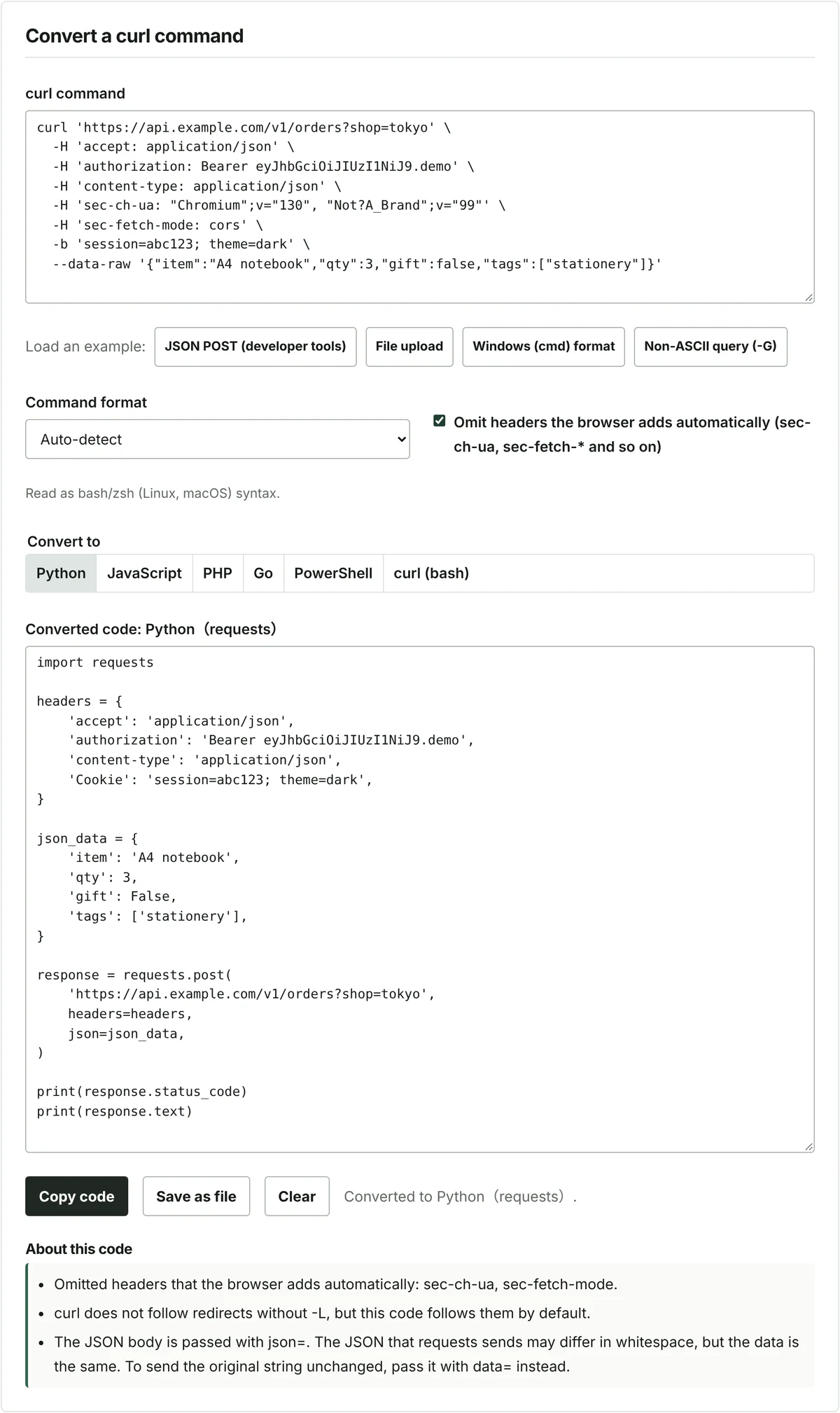
In the result, the -H headers become the headers dictionary and the cookie given with -b is folded into a Cookie header. The JSON from --data-raw becomes a Python dictionary passed to json=. As you can see from false turning into False, the values are in a form that is easy to edit.
A command copied from the browser also contains headers the browser added on its own, such as sec-ch-ua and sec-fetch-mode. Tick “Omit headers the browser adds automatically” and they disappear from the code, while “About this code” below lists the names of the omitted headers. Most APIs respond fine without them, so I leave them out first and only put them back if something fails.
authorization and Cookie contain the token or session of the logged-in user as is. Before pasting the code into a chat or a public repository, delete those values or change the code to read them from environment variables. If the token is a JWT, the JWT Decoder / Encoder shows its expiry and audience. I wrote about narrowing down the cause of a 401 in “Decode a JWT to find out whether a 401 is caused by expiry, the signature or aud”.
To run the converted code, requests must be installed in your Python. If pip install requests stops with an externally-managed-environment error on Ubuntu or Debian, “pip install fails with error: externally-managed-environment” walks through creating a virtual environment.
Checking the request in a table
Under the tool, “What the request contains” shows the method, URL, query, headers and body read from the command as a table.
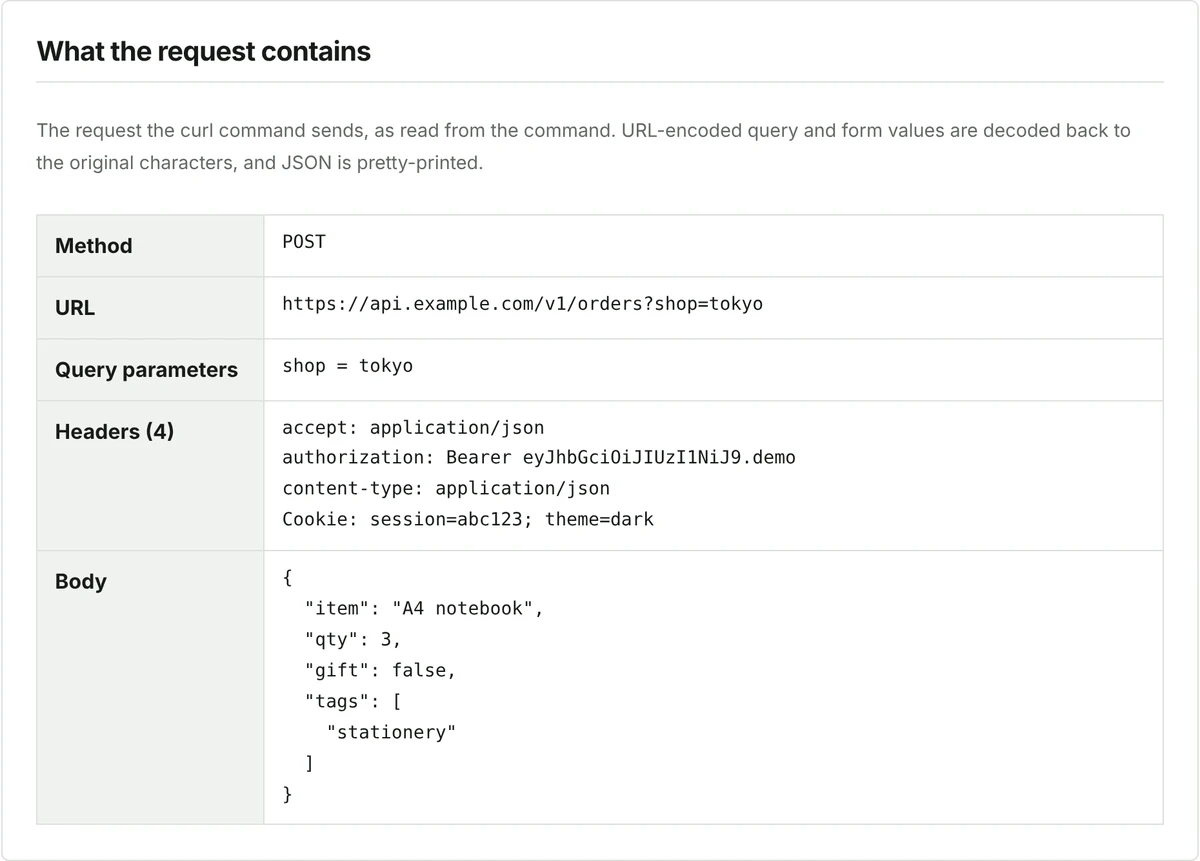
This command has no -X POST. When you pass a body with -d or --data-raw, curl switches the method to POST automatically. That is why Method in the table says POST and the converted Python uses requests.post. If all you want is to understand what a long curl command sends, looking at this table without converting anything is often enough.
JSON sent with -d arrives as a form
API documentation sometimes shows a call like this, without any header.
curl https://api.example.com/v1/items -d '{"name":"test"}'
Convert it, and the Python code contains 'Content-Type': 'application/x-www-form-urlencoded'.
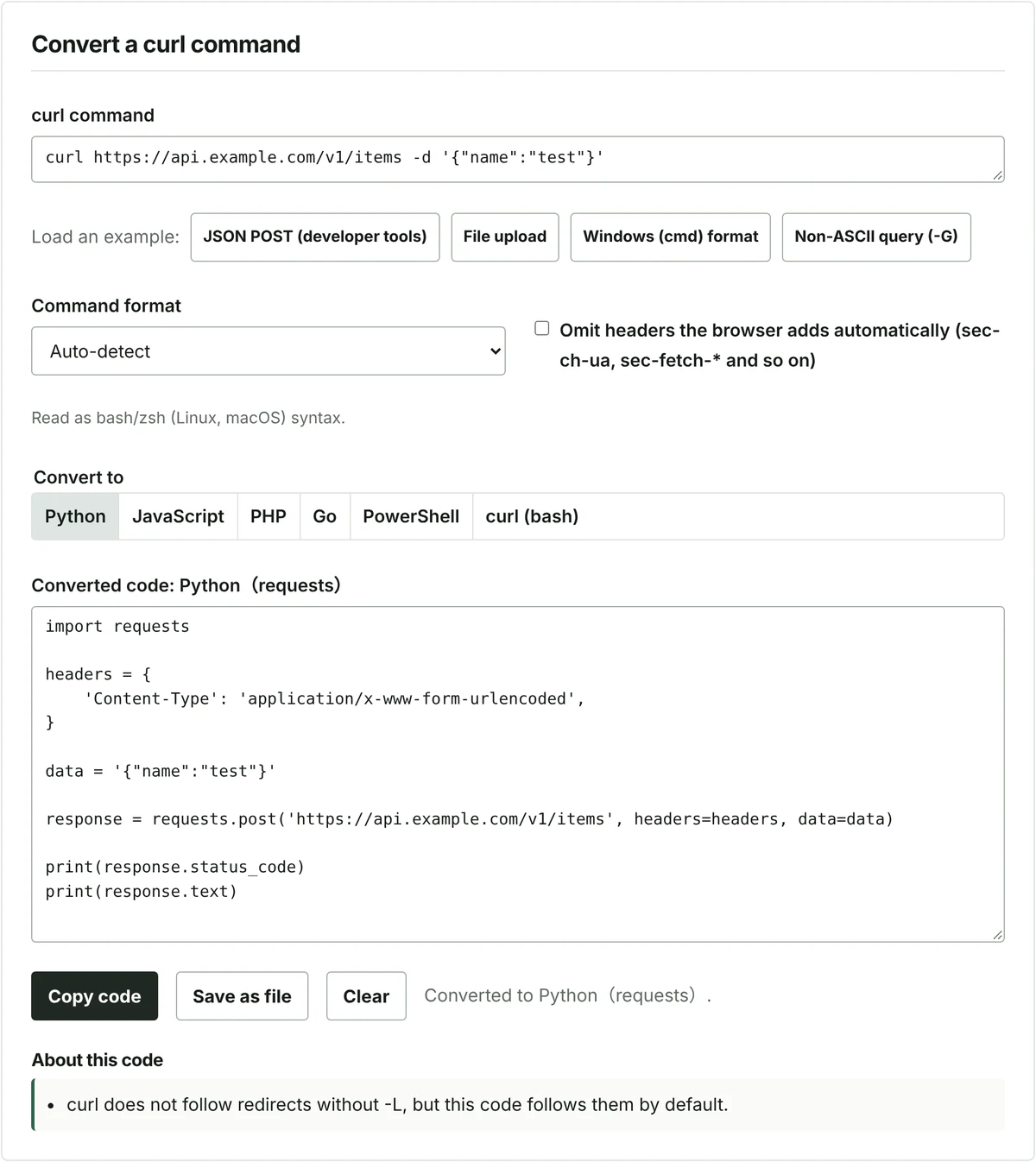
The form type for a JSON body is not a mistake by the tool. When curl sends a body with -d and no Content-Type was given, it adds application/x-www-form-urlencoded. When I received the requests on a local server, curl, the converted Python and the converted JavaScript (Node.js) all arrived like this.
| Sender | Content-Type | Body |
|---|---|---|
| curl 8.5.0 | application/x-www-form-urlencoded | {"name":"test"} (15 bytes) |
| Converted Python (requests) | application/x-www-form-urlencoded | {"name":"test"} (15 bytes) |
| Converted JavaScript (fetch) | application/x-www-form-urlencoded | {"name":"test"} (15 bytes) |
The converted code sends exactly what the original curl sends. If the API accepts this as JSON, the converted code works as it is. If, on the other hand, the API says “set Content-Type to application/json when sending JSON”, then the curl command is missing -H 'Content-Type: application/json'. With curl 7.82 or later you can write --json '{"name":"test"}', which sets both Content-Type and Accept to application/json. The tool reads --json too and produces Python code that uses json=.
What happens when you rewrite it by hand
I also tried writing the same request by hand while looking at the curl command. These two are the usual ways to do it.
requests.post(url, data={"name": "test"})
fetch(url, { method: "POST", body: JSON.stringify({ name: "test" }) });
Here is what reached the server. Neither matches the original curl.
| Code | Content-Type | Body |
|---|---|---|
A dictionary passed to data= in requests |
application/x-www-form-urlencoded | name=test |
A string passed as body to fetch |
text/plain;charset=UTF-8 | {"name":"test"} |
When you pass a dictionary to data= in requests, it is encoded not as JSON but as the form string name=test. fetch sets the Content-Type to text/plain;charset=UTF-8 when the body is a string. Either way, a server waiting for JSON cannot read it. The default behavior that the curl command does not spell out differs from library to library. The tool writes the Content-Type explicitly in the converted code, so the same value arrives whichever library you use.
The JSON formatting changes, but the content stays the same
I also compared a curl command that sets Content-Type to application/json and sends JSON containing Japanese text (ノート means “notebook”).
curl -X POST https://api.example.com/v1/items \
  -H 'Content-Type: application/json' \
  -d '{"name":"ノート","price":1200,"tags":["a"]}'
| Sender | Body received | Bytes |
|---|---|---|
| curl | {"name":"ノート","price":1200,"tags":["a"]} |
46 |
| Converted Python (requests) | {"name": "\u30ce\u30fc\u30c8", "price": 1200, "tags": ["a"]} |
60 |
| Converted JavaScript (fetch) | {"name":"ノート","price":1200,"tags":["a"]} |
46 |
The converted Python passes the JSON to json= as a dictionary. requests turns the dictionary into a JSON string when sending, and in doing so it puts a space after each separator and replaces non-ASCII characters with escapes such as \u30ce. Read as JSON, the value is the same as "ノート", so APIs normally treat it the same way. “About this code” in the tool points this out as well and suggests passing a string to data= if you want the original text sent unchanged. When the body has to go out without a single character changing, for example for an API that computes a signature over the body bytes, switch to that form.
In JavaScript, JSON.stringify() outputs the Japanese characters as they are, so the body was the same 46 bytes as curl. The code converted to PHP and Go from the same command also sent the same 46 bytes as curl. When you build a body while checking its values, looking at its structure in the JSON Formatter / Validator makes it easier to spot a missing closing bracket.
A non-ASCII query, a file upload and Basic authentication
I also compared the “Non-ASCII query (-G)” and “File upload” examples under “Load an example” in the tool, after pointing them at the local server.
curl -G https://www.example.com/search --data-urlencode 'q=東京 ラーメン' -d page=2 -m 10 (the query means “Tokyo ramen”) is sent as a GET request, with the data in the URL query rather than the body because of -G. The converted Python and JavaScript embedded q=%E6%9D%B1%E4%BA%AC+%E3%83%A9%E3%83%BC%E3%83%A1%E3%83%B3&page=2 in the URL. The URL curl sent had lowercase hex letters, as in %e6%9d%b1…, but hexadecimal digits in percent-encoding are case-insensitive, so both are read as the same value. To decode the encoded string and check it, you can use the URL Encoder / Decoder.
-m 10 became timeout=10 in Python and AbortSignal.timeout(10000) in JavaScript. Note, though, that curl’s --max-time limits the whole transfer, whereas the timeout in requests is a separate limit on “until connected” and “until the next piece of data arrives”. With a server that sends data a little at a time, it can wait longer than 10 seconds. The tool shows this difference in “About this code” too.
The file upload example uses Basic authentication with -u admin:s3cret and sends two form fields with -F (a text field and a PDF file). In Python this became files= and auth=; in JavaScript, FormData and an Authorization header. All three sent the same Authorization: Basic YWRtaW46czNjcmV0 header, and the name, file name, Content-Type and content of each form field matched as well. The only differences were the boundary string that separates the fields and, with it, the total byte count. The library picks a new boundary every time it sends, and the server reads the fields using the value given in the header.
A Basic authentication header is nothing more than “username:password” encoded in Base64. Put YWRtaW46czNjcmV0 into the Base64 Converter and you get admin:s3cret back. It is not encryption, so do not use it over a connection that is not HTTPS, and keep it out of logs.
curl does not follow redirects without -L
Unless you add -L, curl does not go on to the redirect target when it receives a 301 or 302 response. requests, fetch, Go and PowerShell, by contrast, follow redirects by default. I made the local server redirect /old to /new with a 302: curl http://127.0.0.1:8765/old stopped at the 302, while the converted Python followed through to /new and got a 200.
The tool shows this difference as “curl does not follow redirects without -L, but this code follows them by default.” If you are calling an API that redirects to another page after login, or you want to read headers in the redirect response itself, add allow_redirects=False in Python or redirect: "manual" in fetch yourself. If you were testing curl with -L, the converted code already behaves the same way.
Reading Windows “Copy as cURL (cmd)” output
Choosing “Copy as cURL (cmd)” in the developer tools on Windows gives you a hard-to-read command with a ^ before every ". It is there so that the Command Prompt does not treat " or { as special characters. The tool detects the format automatically from how ^ is used and reads the command by Command Prompt rules.
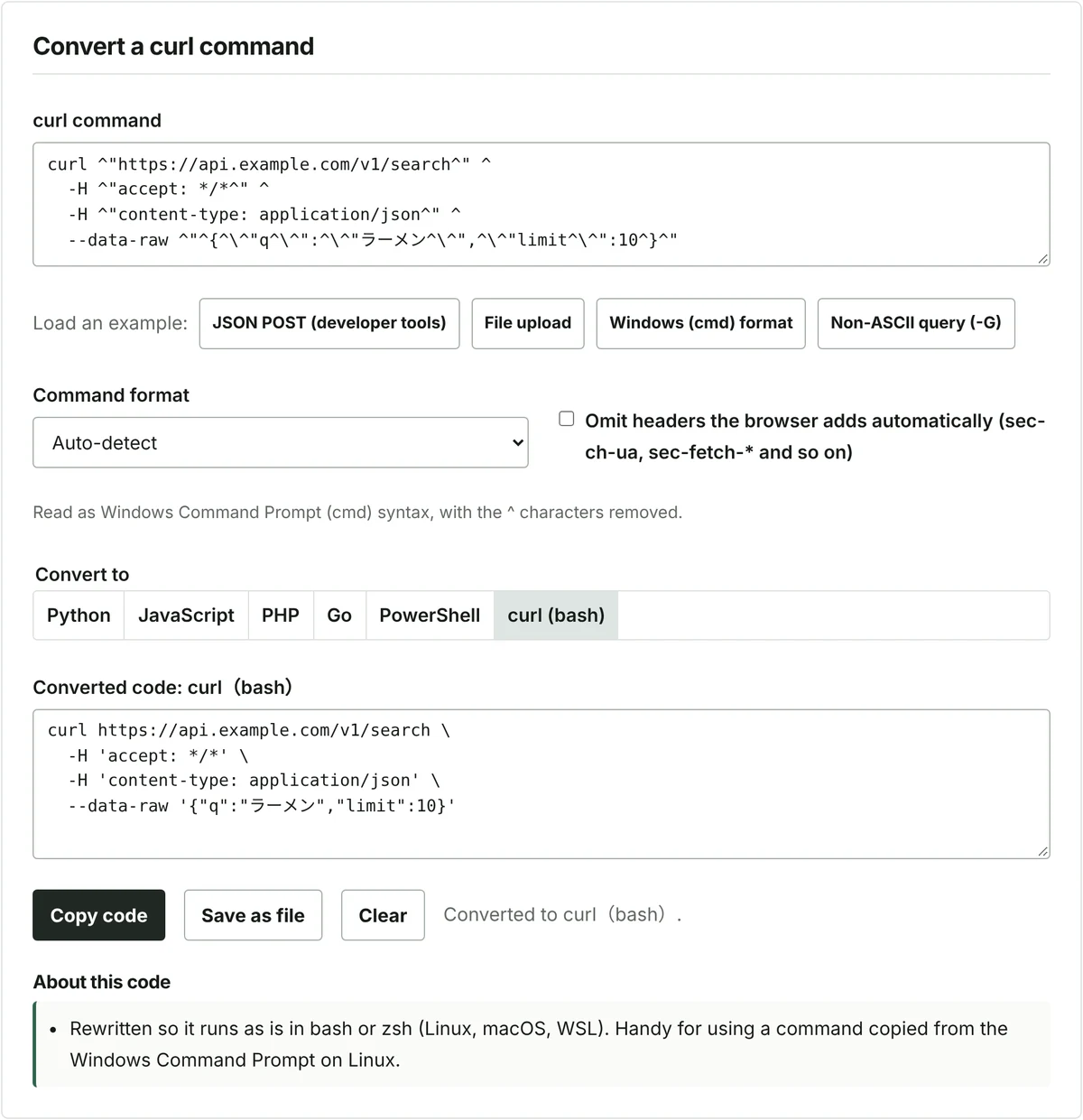
Choose “curl (bash)” under “Convert to” and the tool rewrites it as a curl command that runs as is on Linux, macOS or WSL. When you want to reproduce on a Linux server a request you investigated on Windows, this is the quickest route. Of course, choosing Python or JavaScript turns it into code in the same way.
Going the other way, be careful when you use a curl command written for Linux or macOS on Windows. In Windows PowerShell 5.1, typing curl runs not the real curl but Invoke-WebRequest under an alias, so passing -H or -d produces parameter errors. Type curl.exe with the extension and the curl that ships with Windows 10 (version 1803) and later runs. If you are putting the request into a PowerShell script, choose “PowerShell” and get Invoke-WebRequest code.
What the tool cannot convert
The tool only translates the command; it never actually sends the request. Whether the converted code works depends on the specification of the target API and on whether your token is still valid.
A command that uses a shell variable, such as -H "Authorization: Bearer $TOKEN", keeps $TOKEN literally because the tool cannot expand it. In that case a notice appears below the input box: “The shell variable or command substitution $TOKEN was not expanded and is kept literally.” Change the converted code so that it reads the value from an environment variable.
Client certificates given with --cert and config files given with -K are outside the scope of the conversion, and a message below the input box says they were ignored. --digest and --ntlm authentication are converted as Basic authentication, with a notice saying so. In both cases, rewrite that part of the converted code in the way the library expects. The output file given with -o is not converted either; the converted code prints what it receives. Options that only affect display, such as -s and -v, do not change the request and are ignored without a notice.
Test environment
- curl Command Converter (operated on the English UI), Chromium (via Playwright)
- For comparison: curl 8.5.0, Python 3.13 with requests 2.34.2, Node.js 22, PHP 8.3 and Go 1.24 (all on Linux)
- A server built with Python’s
http.serveron 127.0.0.1 recorded the method, path, headers and body of every request it received as is; curl and the converted code were pointed at it and compared - The converted code was the output of the tool’s conversion logic (
curl-converter-core.js), run without modification