Why does stereo audio disappear in mono? Listen to two six-second WAVs
Hear what happens when the two channels match, the right channel has reversed polarity, or only the left contains sound. Use the WAVs, waveforms and FFmpeg to identify the cause and recover a channel from the original recording.
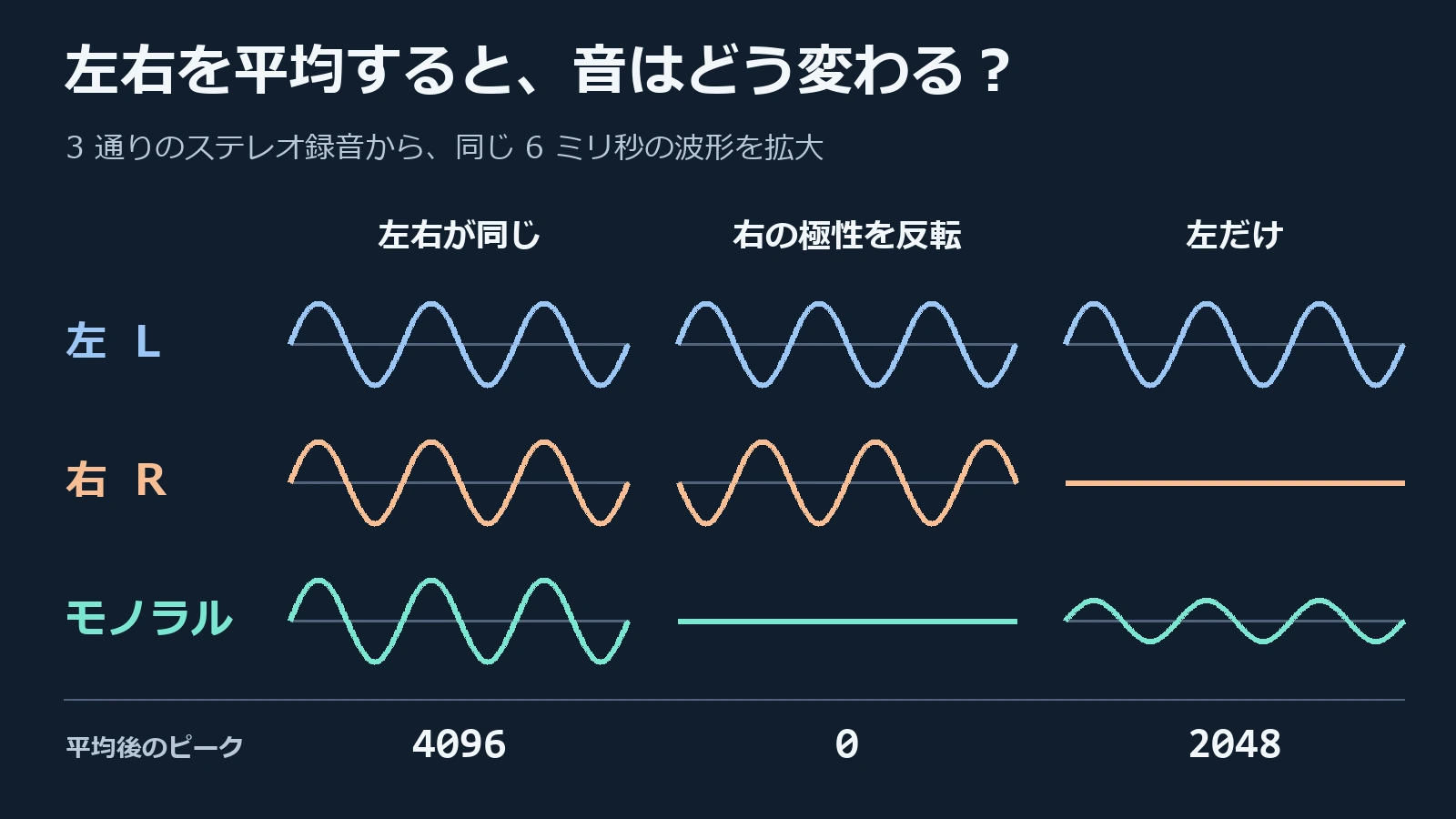
A voice comes through on headphones, then vanishes when you mix the recording to mono. Play the original left and right channels separately. Both can contain the same voice, but if every peak on the left lines up with a trough on the right, the two signals cancel when mixed.
Which of the three cues disappears?
Both clips are six seconds long. Keep the volume fixed and play the stereo original, then the mono mix made by weighting each channel equally. A short low-high cue starts each section at 0, 2 and 4 seconds. For the stereo comparison, turn off mono playback on your device and use headphones with separate left and right channels.
In the mono mix there is a long pause after the first cue, then the last cue returns more quietly. I measured the largest absolute sample value in each section. The left-channel peak is 4,096 in all three sections. What goes into the right channel determines the result.
| Interval and channel relationship | Right peak | Mono peak |
|---|---|---|
| 0–2 s · Same sound in both channels | 4,096 | 4,096 |
| 2–4 s · Right channel polarity reversed | 4,096 | 0 |
| 4–6 s · Sound in the left channel only | 0 | 2,048 |
The first two sections look identical on a peak meter. Add the signed values at the same instant and you can see the difference. If the left is +4,096 and the right is +4,096, the average is +4,096. If the right is −4,096 instead, the average is zero. In the middle section I inverted the entire right waveform, so all 96,000 samples in those two seconds became zero. Audacity’s manual on inversion and cancellation
The last cue represents a recording with sound on only one side. The right channel is zero, so averaging leaves half the left amplitude. This can happen when a single microphone is recorded to one side of a stereo track. Assign that input to a mono track at recording time to hear it in the centre. Focusrite’s example of input and track settings
Extract the channel that still has the voice
Listen to the channels separately in your own recording to find which contains the voice you need. Try it on a computer with FFmpeg and the example file above. The test used FFmpeg 9.0.2 and a 48 kHz, 16-bit integer PCM WAV.
-
Create an empty folder and use Save the stereo WAV above to put
stereo.wavin it. On Windows, open the folder in File Explorer, typepowershellin the address bar and press Enter. -
Run the two lines below one at a time. The first creates
left.wavfrom the left channel and the second createsright.wavfrom the right. Each has one channel and normally plays in both ears on headphones.ffmpeg -i stereo.wav -af "pan=mono|c0=c0" -c:a pcm_s16le left.wav ffmpeg -i stereo.wav -af "pan=mono|c0=c1" -c:a pcm_s16le right.wav -
Listen to both files.
left.wavhas all three cues at the original amplitude.right.wavhas only the first and middle cues. To try your own two-channel recording, replacestereo.wavin the commands with its filename. If one channel contains the whole voice you need, you can edit with that WAV. Keep both when you recorded separate speakers on the left and right.
The mono sample above came from the same input. The expression gives the left (c0) and right (c1) a weight of 0.5 each. Convert it yourself and listen to the middle of average.wav to compare with extracting a single channel. The pan filter in the FFmpeg documentation
ffmpeg -i stereo.wav -af "pan=mono|c0=0.5*c0+0.5*c1" -c:a pcm_s16le average.wav
If your only copy is the mono mix with the silent passage, turning it up will leave that passage silent. Go back to the stereo source or the project before the mix.
When the sound becomes thin instead of silent
When two spaced microphones record an instrument, sound reaches them at different times. A mono mix can weaken some frequencies and strengthen others. Every sample in the middle of this example reached zero because the channels were equal in amplitude and exactly opposite.
Before the next session, record a short test and listen to the mic pair in mono. If the bass sounds thin, for instance, compare with each mic alone, move a mic a little and record again. This lets you investigate while the setup is still in place. Shure’s recording guide, “Spaced Pair”