Why merged files reappear in a GitHub PR after Squash and merge
Reproduce a repeated file in GitHub’s Files changed tab, see how the first merge changed the common ancestor, and put only the new work up for review.
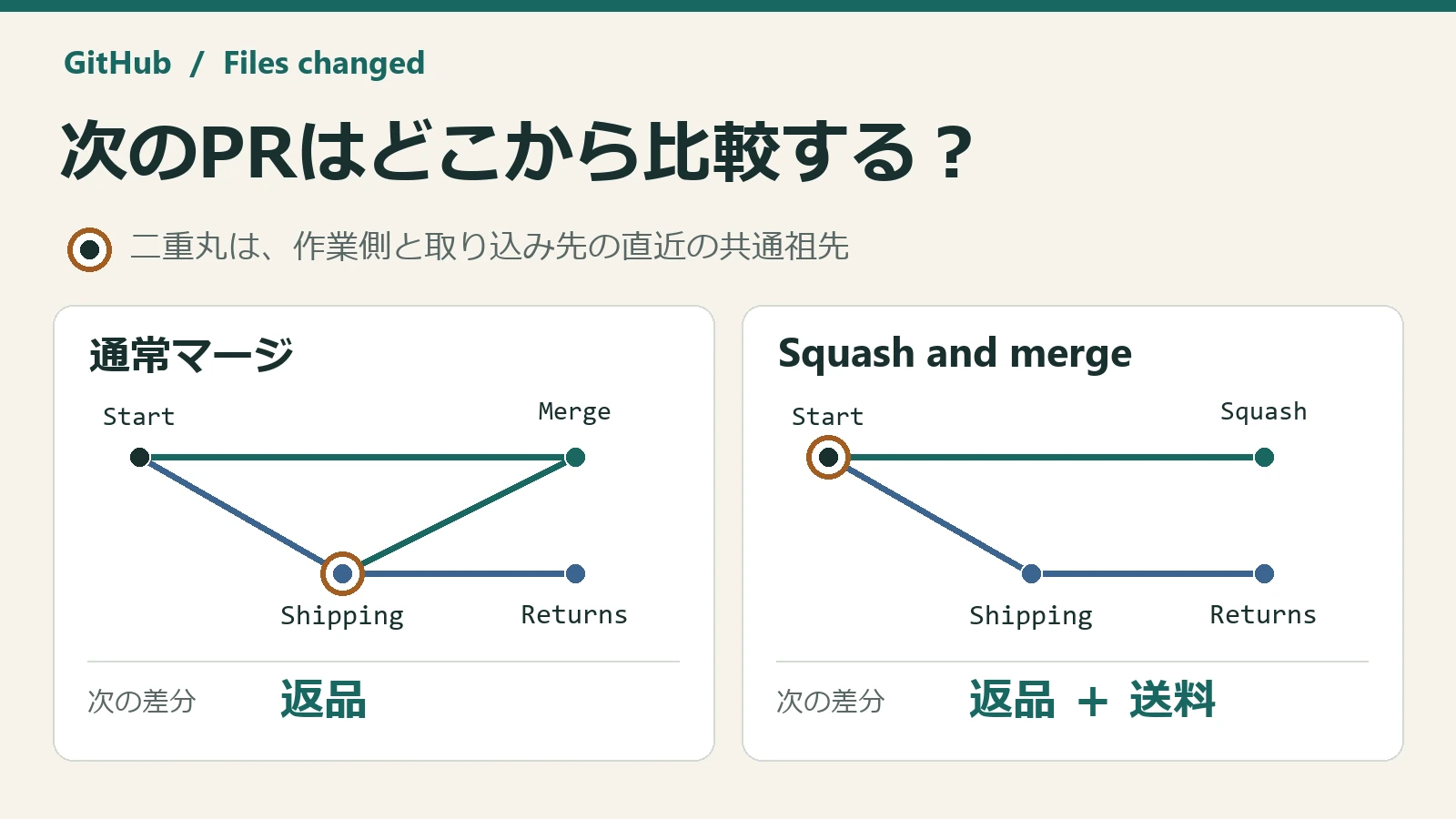
The pull request (PR) adding our shipping notice was merged. I kept working on the same branch and wanted to put only the return deadline up for review. But GitHub’s Files changed showed shipping.md in green as an addition alongside returns.md. I could already see the shipping notice on main.
I reproduced it locally and compared a regular merge with Squash and merge. Both versions of main had identical files immediately after accepting shipping. Even so, one next-PR comparison showed just returns, while the other also showed shipping.
Check the repeated file in your PR
Check the base (destination) and compare (branch under review) at the top of the PR. Here both branches are in the same repository and the PR brings topic into main. Substitute your own branch names as needed.
- Run
git fetch originin the repository to updateorigin/mainandorigin/topicto the positions on the server. - The first command compares the snapshots at the branch tips. The second has three dots and compares the common ancestor through the tip of the working branch. It corresponds to Files changed in a new PR. GitHub’s explanation of PR diffs
git diff --name-status origin/main origin/topic
git diff --name-status origin/main...origin/topic
The first command listed only A returns.md. The second also listed A shipping.md. A means added relative to the starting snapshot. If shipping appears only in the second result, its file is the same at both tips and was absent from the PR’s starting snapshot. If it appears in the first result too, the tips still differ. Read git diff origin/main origin/topic -- shipping.md to see how.
Bring in the same shipping notice two ways
In an empty repository under Git for Windows 2.50.1, I named the commit before any notices Start and the one adding shipping Shipping. I accepted Shipping on two branches, making a normal merge commit on one and a new commit with squashed changes on the other. Then I added returns.md to the original working branch. The right-hand tip in both comparisons was the same commit.
| Merge method | Comparison starts | Files in the next diff |
|---|---|---|
| Regular merge | After adding shipping | Returns |
| Squash | Before adding shipping | Returns and shipping |
The regular merge has Shipping in its ancestry. Only returns were added to the working branch from that point. A squash creates a new commit on main that contains the shipping notice and has Start as its parent. No parent path leads back to the working branch’s Shipping. The nearest ancestor on both sides is still Start, which predates both notices. GitHub on squash merges and branch reuse
Would reviewing a two-dot comparison (git diff main..topic, tip to tip) work? I added contact.md only on main to simulate another contributor adding contact details. Comparing the tips reported D contact.md in addition to the returns file because topic had yet to receive contact details. A trial merge kept the contact file and added returns. A deletion shown in a comparison need not happen when the changes are merged.
Put only returns up for review
If you are just starting returns after shipping was merged, run git fetch origin and start a new branch with git switch -c returns-only origin/main. What if returns are already committed on the old branch?
The steps below assume returns are in one standalone commit and all work is committed. Keep the old branch and move that one change onto a branch from the current main.
- Confirm
git status --shortis empty and rungit fetch origin. Find the returns commit withgit log --oneline topic. Rungit show --stat COMMIT_IDto inspect the affected files, using the ID at the start of the log entry. - Switch using
git switch -c returns-only origin/main. The branch already has the merged shipping notice and the other contributor’s contact file. - Apply the returns commit with
git cherry-pick COMMIT_ID. If you hit a conflict you cannot resolve,git cherry-pick --abortreturns to the previous state. The commit stays available ontopic. Git’s cherry-pick docs - Check that
git diff --name-status origin/main...HEADshows onlyA returns.md, then read the content usinggit diff origin/main...HEAD. If correct, rungit push -u origin returns-onlyand open a PR withmainas base andreturns-onlyas compare. Link the replacement from the original PR so reviewers can find it.
In the lab the new branch contained shipping, returns, and contact details. Only returns appeared in review.
Keep the existing PR under review
If comments are already in progress, you may want to keep the original PR. When the team allows merge commits on a working branch, merge in the opposite direction, from main into topic, to narrow the original PR’s Files changed list.
- With no uncommitted changes, run
git switch topicandgit fetch origin. Ifgit rev-parse HEAD origin/topicprints the same ID twice, your local branch is at the PR tip. - On
topicrungit merge origin/main. The latestmainis now an ancestor of the working branch. Usegit merge --abortif you need to back out of a conflict. - Run
git diff --name-status origin/main...HEAD. The lab showed onlyA returns.md. Readgit diff origin/main...HEADtoo, then rungit push origin topicto update the same PR.
Recreate the history to inspect the diff and merged files
Paste the whole block into a shell such as Git Bash. It creates a test repository in a new temporary folder and prints its path. with-merge receives the normal merge; main receives the squash.
(
set -e
lab=$(mktemp -d)
cd "$lab"
pwd
git init -q -b main
git config user.name "PR Diff Lab"
git config user.email "lab@example.invalid"
git config commit.gpgsign false
git commit -q --allow-empty -m Start
git branch with-merge
git switch -q -c topic

echo "Standard shipping: 500 yen" > shipping.md
git add shipping.md
git commit -qm Shipping
git branch first-pr
echo "Returns accepted within 14 days" > returns.md
git add returns.md
git commit -qm Returns

git switch -q with-merge
git merge -q --no-ff first-pr -m "Merge shipping"
git switch -q main
git merge -q --squash first-pr
git commit -qm "Squash shipping"
git diff --exit-code with-merge main

for base in with-merge main
do
  echo "=== $base ==="
  git log -1 --format='common ancestor: %s' "$(git merge-base "$base" topic)"
  git diff --name-status "$base" topic
  git diff --name-status "$base"...topic
done

echo "Customer support" > contact.md
git add contact.md
git commit -qm Contact
git diff --name-status main topic
git switch -q -c trial-merge main
git merge -q --no-ff topic -m "Merge returns"
git ls-tree --name-only HEAD

git switch -q -c returns-only main
git cherry-pick topic
git diff --name-status main...HEAD
git ls-tree --name-only HEAD

git switch -q topic
git merge -q --no-ff main -m "Bring main into topic"
git diff --name-status main...topic
)