With a 10 MB email limit, exactly how many bytes can you attach?
The attachment limit and the whole-message limit count different things. A local SMTP test pinpoints the last accepted byte and shows how Base64 wrapping and MB versus MiB shift it.
If an email may be at most 10 MB, can I attach a 7.3 MB file? A rough multiplier of 1.4 gives 10.22 MB, but a real message can fit. Shrinking the file would solve the immediate problem. I wanted to find the last byte that would go through and the first that would not, so I fixed what to count and set up a receiver on my own PC.
What does the 10 MB limit count?
A composer’s per-file cap and its cap on total attachment size differ as soon as you choose two 6 MB files. Personal Gmail’s 25 MB limit applies to the total size of files attached and larger attachments become a Drive link. Kobe University’s mailing-list default of 10 MB covers an entire submitted message, attachments included, and larger posts await moderation. You can compare the local file sizes directly against Gmail’s attachment limit. Gmail Help · Kobe University FAQ (Japanese)
With a whole-message cap, the encoded attachments share space with the subject, addresses, body, signature, filenames and line endings. SMTP SIZE counts the headers and body including their line endings. A relay or the final receiver may enforce another limit even after the first server accepts the message. RFC 1870 §5–6
Sending to a server capped at 10,000,000 bytes per message
I set 10 MB = 10,000,000 bytes. With Python 3.12.14 I kept a short English body, example addresses and one attachment named part-1.bin fixed, changing only the number of zero bytes in the file. The local aiosmtpd 1.4.6 server advertised SIZE 10000000 in its EHLO reply. The client declared the complete message size.
| Original attachment | Whole message and SMTP reply |
|---|---|
| 7,307,301 B | 10,000,000 B. 250 OK after receiving the body |
| 7,307,302 B | 10,000,004 B. 552 when the size was declared |
The largest attachment accepted here was 7.307301 MB, and the received message matched the sent bytes. One more input byte added four to the message. The server rejected the declaration before receiving the content.
Why does one extra byte turn into four?
Base64 represents three input bytes with four characters. A final group with only one byte still takes four characters and is padded with =. The original 7,307,301 bytes divide evenly by three. One extra zero needs a new AA== group. RFC 2045 §6.8
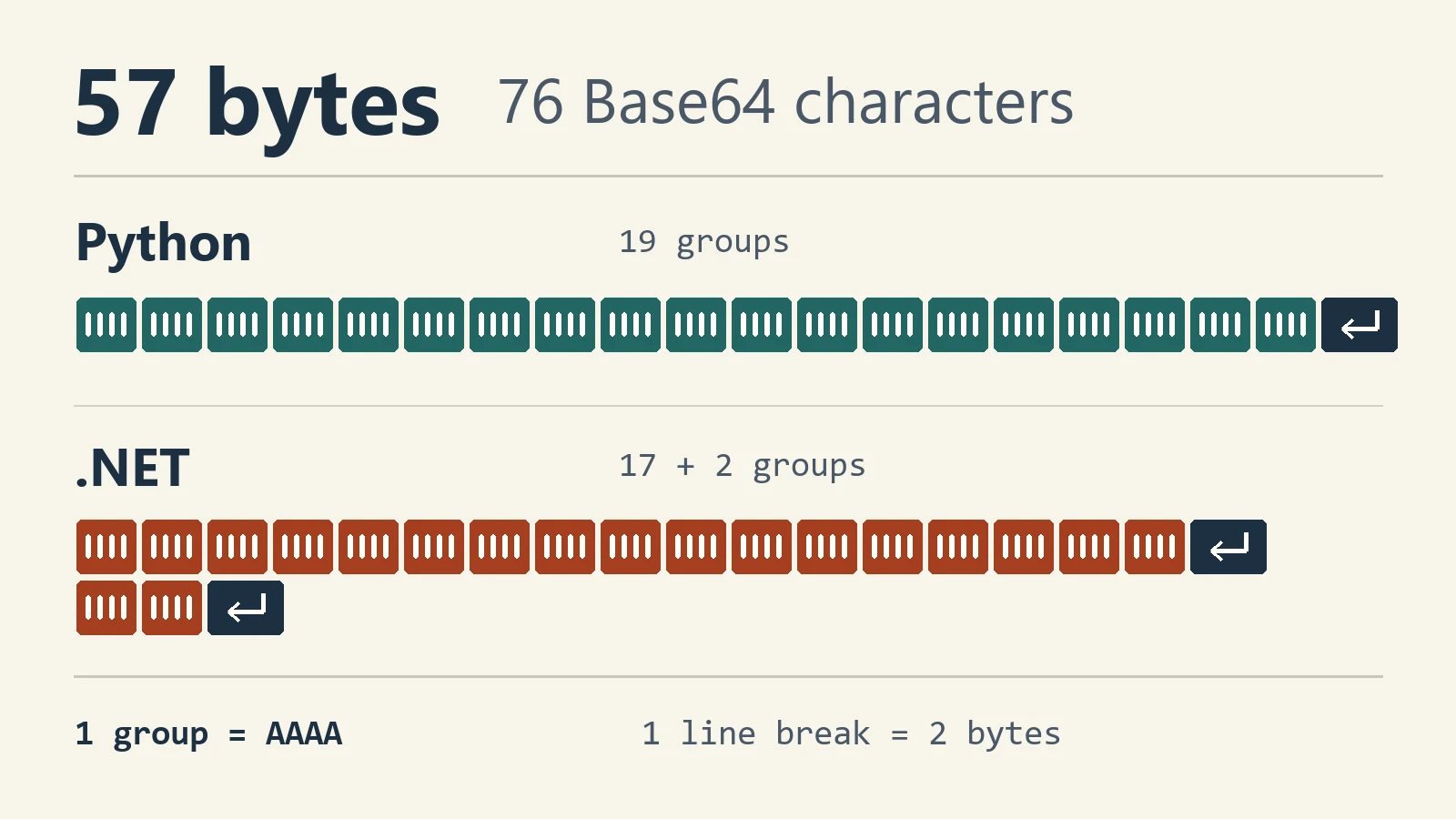
In the Python message, 57 bytes produced 76 Base64 characters and a two-byte CRLF, a total of 78 bytes or roughly 1.3684 times the input. The original 7.3 MB file therefore yielded a 9,990,012-byte message. Everything outside the encoded data lines took 534 bytes. That left 9,999,466 bytes for 128,198 complete lines of 78 bytes and 22 extra bytes. Set aside two for the last CRLF and 20 characters remain, encoding 15 bytes. 57 × 128,198 + 15 = 7,307,301 bytes, exactly the observed limit.
When the same 7.3 MB file no longer fits
With .NET 10.0.14 and System.Net.Mail, the 7,300,000-byte file took 10,019,612 bytes for the attachment data alone. The 9,733,336 Base64 characters matched Python exactly once I removed the line endings. The difference was the wrapping.
| 7.3 MB attachment | Lines | Line-ending bytes |
|---|---|---|
| Python (76 characters wide) | 128,071 | 256,142 B |
| .NET (68 characters wide) | 143,138 | 286,276 B |
MIME permits up to 76 characters per Base64 line. Python’s general email line-length setting is 78, so complete groups of four make 76. The .NET default is 70, with headroom to avoid additional wrapping of variable-length headers. Its attachment encoder uses that value too, putting 17 groups or 68 characters on each line. The extra 15,067 CRLFs cost 30,134 bytes. At a Python setting of 70, all 143,138 lines matched .NET, down to the last 20 characters. Turn off word wrap to compare the two raw messages. Download both messages (ZIP, 68,937 bytes). Python email.policy · CPython contentmanager.py · .NET EncodedStreamFactory · .NET MimePart · .NET Base64Encoder
Raising only the limit to 10 MiB = 10,485,760 bytes let the same Python message carry 7,662,279 bytes (10,485,758 bytes total). 7,662,280 bytes was rejected (10,485,762 bytes total). Two bytes remain unused because the next Base64 group takes four.
An exact answer depends on which stage counts the bytes and on the particular message. If someone asks me about a 10 MB limit again, I’ll probably still say to keep the attachment around 7 MB. One added punctuation mark in the subject is enough to change the 7.307301 MB boundary.
Changing the subject by one character and splitting an attachment in two
Adding ! to the Python subject Documents makes the exact-fit message 10,000,001 bytes. Removing one or two attachment bytes changes AAAA to AAA= or AA== without shortening the group. Three fewer bytes give a 9,999,997-byte message.
One 8 MB attachment gives a 10,947,904-byte message. Putting two 4 MB files in that message adds 184 bytes for the additional filename, boundary and related fields. Sent separately, each message totals 5,474,222 bytes. That helps when the limit applies to each message.
Build the messages and compare the two samples
Save the following as measure.py and run python measure.py with Python 3. It prints message sizes and the Python line count. The SMTP test also uses its make_mail function.
from email.message import EmailMessage
from email.parser import BytesParser
from email.policy import SMTP
from pathlib import Path
import sys


def make_mail(sizes, policy=SMTP, subject="Documents"):
    mail = EmailMessage(policy=policy)
    mail["From"] = "sender@example.org"
    mail["To"] = "reader@example.org"
    mail["Date"] = "Wed, 25 Nov 2026 09:00:00 +0900"
    mail["Subject"] = subject
    mail.set_content("Please see the attached files.")
    for number, size in enumerate(sizes, start=1):
        mail.add_attachment(bytes(size), maintype="application",
                            subtype="octet-stream", cte="base64",
                            filename=f"part-{number}.bin")
    mail.set_boundary("attachment-size-test")
    return mail.as_bytes()


def inspect_part(raw):
    msg = BytesParser(policy=SMTP).parsebytes(raw)
    part = next(msg.iter_attachments())
    assert part.get_payload(decode=True) == bytes(7_300_000)
    lines = part.get_payload().splitlines()
    encoded = "".join(lines)
    print(f"{len(lines[0])} columns, {len(lines):,} lines,",
          f"{len(encoded) + 2 * len(lines):,} bytes with CRLF")
    return lines


if __name__ == "__main__":
    for sizes in [(7_000_000,), (8_000_000,), (4_000_000, 4_000_000),
                  (4_000_000,), (7_300_000,), (7_307_301,), (7_307_302,)]:
        print(sizes, f"{len(make_mail(sizes)):,} bytes")


    for removed in range(4):
        size = 7_307_301 - removed
        message = make_mail([size], subject="Documents!")
        print(f"Documents!  {size:,} -> {len(message):,} bytes")

    reference = inspect_part(make_mail([7_300_000]))
    if len(sys.argv) > 1:
        other = inspect_part(Path(sys.argv[1]).read_bytes())
        assert "".join(reference) == "".join(other)
        print("Identical Base64 characters")
        narrow = inspect_part(make_mail([7_300_000], SMTP.clone(max_line_length=70)))
        assert narrow == other
        print("Identical Base64 lines at 70")
Place dotnet.eml from the ZIP in the same directory and run python measure.py dotnet.eml. The script checks that both decode to the same 7,300,000 bytes and prints Identical Base64 characters when the unwrapped data matches. With Python’s line length set to 70, matching wrapping also gives Identical Base64 lines at 70.
To create the .NET message yourself, run this in Windows PowerShell. I used PowerShell 7.6.9 and .NET 10.0.14. Quote the temporary .eml path printed at the end and pass it to python measure.py for the same comparison.
$ErrorActionPreference = 'Stop'
$folder = Join-Path ([IO.Path]::GetTempPath()) ([guid]::NewGuid().ToString())
[void][IO.Directory]::CreateDirectory($folder)
$mail = [Net.Mail.MailMessage]::new('sender@example.org', 'reader@example.org',
    'Documents', 'Please see the attached files.')
$client = [Net.Mail.SmtpClient]::new()
try {
    $data = [IO.MemoryStream]::new([byte[]]::new(7300000))
    $part = [Net.Mail.Attachment]::new($data, 'part-1.bin', 'application/octet-stream')
    $part.TransferEncoding = [Net.Mime.TransferEncoding]::Base64
    $mail.Attachments.Add($part)
    $client.DeliveryMethod = [Net.Mail.SmtpDeliveryMethod]::SpecifiedPickupDirectory
    $client.PickupDirectoryLocation = $folder
    $client.Send($mail)
} finally {
    $client.Dispose()
    $mail.Dispose()
}
(Get-ChildItem -LiteralPath $folder -Filter '*.eml').FullName
Reproduce the acceptance boundary with local SMTP
Save the script as smtp_limit.py beside measure.py. In a Python virtual environment run python -m pip install aiosmtpd==1.4.6, then python smtp_limit.py. Make sure 127.0.0.1:18025 is available. The four output lines give the cap, attachment bytes, message bytes and SMTP reply. For accepted messages, the script also checks the receiver got the exact bytes sent. aiosmtpd SMTP
import smtplib
from aiosmtpd.controller import Controller
from measure import make_mail


class Receiver:
    def __init__(self):
        self.received = None

    async def handle_DATA(self, server, session, envelope):
        self.received = envelope.original_content
        return "250 OK"


def try_limit(limit, largest):
    receiver = Receiver()
    controller = Controller(receiver, hostname="127.0.0.1", port=18025,
                            data_size_limit=limit)
    controller.start()
    try:
        for size in (largest, largest + 1):
            message = make_mail([size])
            receiver.received = None
            with smtplib.SMTP("127.0.0.1", 18025, local_hostname="client.example.org",
                              timeout=30) as client:
                client.ehlo()
                assert int(client.esmtp_features["size"]) == limit
                code, _ = client.mail("sender@example.org", [f"SIZE={len(message)}"])
                if code == 250:
                    assert client.rcpt("reader@example.org")[0] == 250
                    code, _ = client.data(message)
            if size == largest:
                assert code == 250 and receiver.received == message
            else:
                assert code == 552 and receiver.received is None
            print(f"{limit:,} / {size:,} / {len(message):,} / SMTP {code}")
    finally:
        controller.stop()


try_limit(10_000_000, 7_307_301)
try_limit(10 * 1024**2, 7_662_279)